301 Redirect Backlinks: What Happens to Your Link Equity?
By Toy Wen Da, Co-Founder · Updated · 13 min read · scored 91/100
301 redirect backlinks keep most of their SEO value when the old URL sends a single, direct 301 to a closely matching live page, so authority flows through almost intact. Chains, loops, 302s and redirects to unrelated pages are what break the transfer.

Before you do anything else, run the page through the free broken link checker. It flags dead links, redirect loops and inbound links that land on a 404 instead of a working redirect, which is the failure that drains backlink value without anyone noticing.
What a 301 redirect does to a backlink

A 301 redirect tells browsers and search engines that a page has moved permanently. The server responds with a "301 Moved Permanently" status and sends the visitor to the new address automatically. Search engines read that signal and update their index, so the new page takes the old page's place and inherits the ranking strength the old one had earned.
Say another site linked to example.com/blog-2020, and you move that content to example.com/seo-tips. A 301 sends every visitor to the new page instead of a dead end, and the old post's link equity goes with them.
Why this matters for backlinks specifically
A backlink is only worth something if the page it points to works. When you change a URL without redirecting it, every site linking to the old address now points at a 404. The link still exists on the referring site, but it delivers no visitor, no ranking signal and no equity.
A 301 fixes that without asking the other site to update anything. The link keeps working, and its SEO value keeps flowing to your current page. This is why redirects matter so much during a site migration, a rebrand or a simple URL cleanup.
Why 301 beats a 302 for preserving link value
A 302 redirect tells search engines the move is temporary, so the original URL stays the one indexed and credited. If you want a backlink's authority to transfer, the redirect has to be a 301. Using a 302 on a permanent URL change is one of the quieter ways people strand their own link equity.
The HTTP standard backs this up. RFC 7231 is the IETF's specification for HTTP semantics, and it defines 301 as a permanent move and 302 as temporary, the exact signal search engines rely on.
| Redirect type | What it signals to search engines | Effect on backlink value |
|---|---|---|
| 301 (permanent) | The page has moved for good; update the index | Equity transfers to the new URL |
| 302 (temporary) | The move is short-term; keep the old URL indexed | Equity mostly stays with the old URL |
| 307 (temporary, method-preserving) | Same as 302, used mainly for form/API requests | Not appropriate for standard page moves |
| 308 (permanent, method-preserving) | Permanent move, rarely used for normal pages | Behaves like a 301 for most SEO purposes |
How much link equity a 301 redirect actually passes

No universal fixed percentage can be quoted with confidence. The amount varies by site, by how clean the redirect is and by how closely the new page matches the old one. The direction is consistent across the industry's guidance: a clean, single-hop 301 to a relevant page passes the large majority of the original link's value, while a messy one bleeds value. Multiple hops, a mismatched destination, or a redirect left unverified for months can all cause that.
What a clean transfer looks like
Picture a blog post at an old URL that has collected several external links over the years. You rename it and set up one 301 straight from the old address to the new one, so users and crawlers land exactly where they should in a single hop. This is the setup most likely to carry 301 redirect backlinks forward with minimal loss.
What erodes the transfer
Every extra hop in a redirect path is a chance for a timeout, a loop or a step that degrades the signal. Google's Search Central community has fielded repeated questions from site owners about how a 301 affects SEO, and the consistent theme is that a direct, well-targeted redirect is treated far more favorably than a chained one. You can read the thread on Google's Search Central Help Community to see how Google's support staff and site owners discuss it.
Check your backlinks' redirect health first
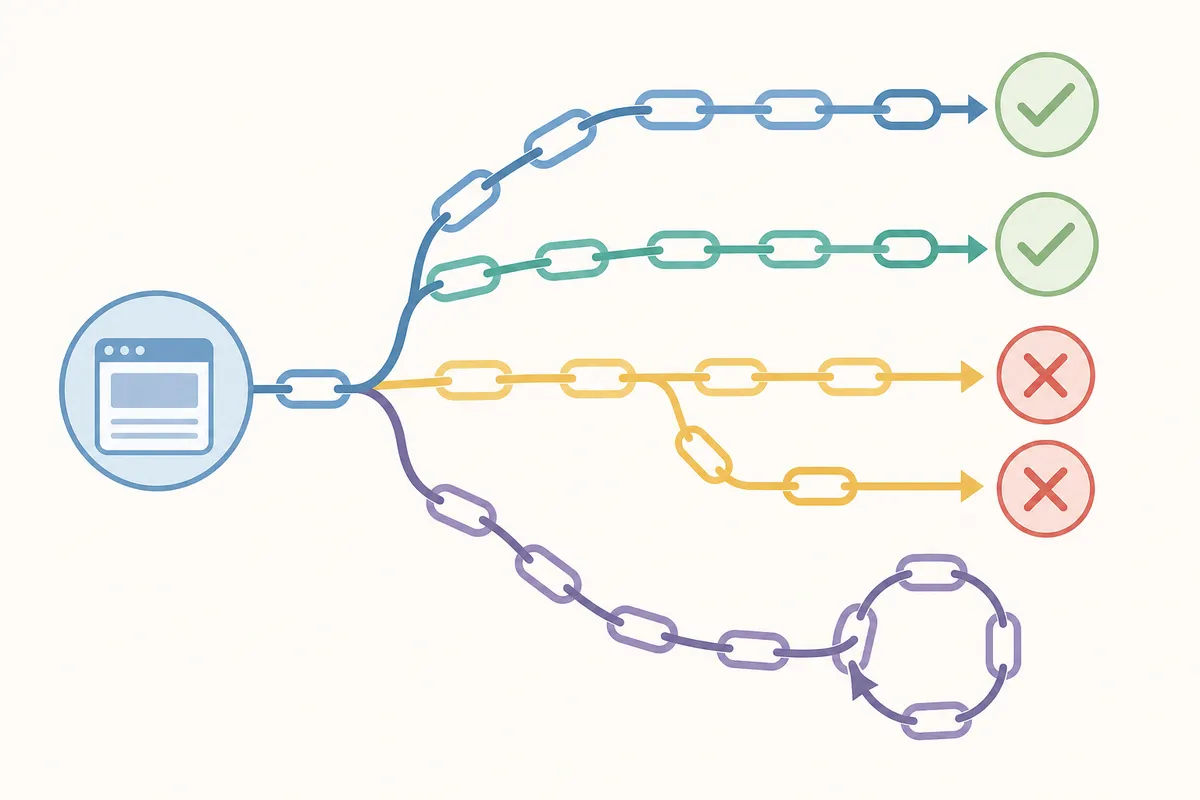
Before you touch any settings, find out which of your backlinks are affected. Pull a list of referring URLs from whatever backlink tool you use, then check where each old link currently resolves. A link that lands on a 404, loops, or chains through three hops before arriving is losing value right now.
Your social profiles deserve a look too, since bio links and profile URLs get moved or renamed more often than people expect. To pull every link across your profiles faster, see check social backlinks across your profiles.
The fix inside your website: step-by-step

Once you know which URLs need a redirect, the fix usually takes a few minutes per link. The exact menu depends on your platform, but the steps are the same everywhere.
Step 1: Confirm the old URL and the right new destination
Copy the exact old URL, including the trailing slash and any query string that backlinks use. Then pick the live page with the closest content match. Redirecting to an unrelated page, or defaulting everything to your homepage, weakens the transfer even when the status code is a correct 301.
Step 2: Create the redirect rule in your platform
Most modern site builders and CMS platforms have a dedicated redirects screen, so you rarely need to edit server files. Open your site's settings or SEO tools and find the section labeled something like "Redirects." Enter the old path and the new path, then confirm the rule is saved as a permanent (301) redirect and not a temporary one.
If you're not sure where that setting lives on your platform, these step-by-step guides match current menu names:
- WordPress 301 redirect, fixed in three steps
- Shopify 301 redirect, a five-minute fix
- Squarespace 301 redirect setup
- Webflow 301 redirect for a broken link
- Wix 301 redirect for a broken link
- Cloudflare 301 redirect, set up in under five minutes
If you manage redirects at the server level, an .htaccess rule on an Apache server can handle the same job. A single old page can be redirected with a line like Redirect 301 /old-page-url https://www.example.com/new-page-url, and an old domain can be sent to a new one with a rewrite rule that matches the host and forwards each path.
Step 3: Test the redirect from the old URL
Open the old URL in a private browser window and confirm it lands on the new page in one hop, not several. A dedicated checker earns its keep here: paste the old URL into a redirect checker and it traces the full chain hop by hop, flagging anything that isn't a clean single 301.
Step 4: Watch for the redirect notice in Search Console
After search engines re-crawl the old URL, Google Search Console shows it under a "Page with redirect" status instead of indexing it. This is expected and not an error on its own, but confirm the redirect target is the page you intended. This guide on fixing a page with redirect in Google Search Console covers what the status means and whether action is needed.
Step 5: Give it time before you judge the result
Search engines need to re-crawl and re-index before authority fully settles on the new URL. A short dip in rankings right after the redirect goes live is normal. If the new page is otherwise well optimized, rankings typically recover to the same level or better once the index updates.
When your website's own tools are enough, and when they aren't
A free checker and your platform's redirect settings cover a lot of ground, but not every situation.
| Scenario | Is the free/built-in route enough? | Why |
|---|---|---|
| One URL moved, one backlink to check | Yes | A single redirect check and a one-line rule in your CMS handles it directly |
| A handful of old blog posts renamed | Yes | Still manageable link by link with a checker and your platform's redirect screen |
| Full site migration to a new domain | Usually not alone | Hundreds of URLs need mapped, 1-to-1 redirects; missing even a few loses real backlinks |
| Recurring 404s showing up every month | Not with spot-checks | Points to a structural issue, such as broken internal links, a faulty plugin or an unstable URL structure, that needs a full crawl |
| Merging several pages into one | Partially | The redirect itself is simple, but deciding which page should "win" the merged authority takes judgment |
| Redirect chains discovered across dozens of pages | Not with manual checking | Needs a site crawl to find every chain, not just the ones you happen to test |
For one link, one URL or a small cleanup, the free route is genuinely enough, and you don't need to pay anyone to fix a single redirect. A domain migration, content merged at scale, or the same errors resurfacing every month is a different situation. When the errors come back monthly the problem is structural, and a one-off fix won't hold. A full technical audit from a professional is then the cheaper route, because it saves you from losing backlinks you can't easily rebuild.
Common causes and fixes for lost link equity
| Cause | What it looks like | Fix |
|---|---|---|
| Redirect chains (A → B → C) | Old URL hops through two or more pages before reaching the final destination | Update the first redirect to point straight at the final URL, skipping the middle steps |
| Redirect loops | A page redirects back to itself or to another page in the same loop | Trace the loop and remove the rule that sends traffic back to where it started |
| 302 used instead of 301 | The server marks the move as temporary | Change the rule's status code to a true 301/permanent redirect |
| Redirecting to an unrelated page | Old content lands on a page about something else entirely | Point the redirect to the closest topical match, or the most relevant hub page |
| Defaulting everything to the homepage | Dozens of old URLs all redirect to the site's homepage | Map each old URL to its actual replacement page instead of a blanket homepage rule |
| Mixed www / non-www or http / https versions | Four versions of the same site exist without redirects between them | Pick one canonical version and 301 every other variant to it in a single hop |
| Redirect set up but never tested | Rule saved in the CMS but never verified live | Test the old URL directly after saving, and re-check a week later |
For more on avoiding ranking loss during the process itself, see how to do a 301 redirect without losing your rankings.
Common mistakes people make with 301 redirect backlinks
Redirecting without checking where backlinks actually point
It's easy to redirect from your own sitemap and forget that external sites link to URL variations too, such as a version with or without a trailing slash, different capitalization or an old parameter-based URL. Each variant needs its own working path to the new page, or the backlink pointing to it goes unclaimed.
Treating every 404 the same way
Not every broken page has a backlink attached. Redirecting every 404 on your site, including pages nobody links to, wastes time better spent on the ones that carry link equity, so start with the URLs that have real backlinks.
Forgetting earned links from PR and outreach
Links you landed through outreach, journalist requests or guest posts are often your highest-value backlinks, and they're the easiest to lose track of during a redesign. If you're pursuing that kind of coverage, see HARO backlinks, what they cost, and your odds of landing one for reference. It shows how much effort those links represent, which is exactly why they're worth protecting with a solid redirect.
Leaving chains in place "because they still work"
A chain of two or three redirects still gets a visitor to the right page, so it's tempting to leave it alone. Every extra hop is still an unnecessary step for crawlers and a documented source of value loss, so collapse chains to one hop whenever you find them.
Assuming the redirect is permanent, then forgetting about it
Redirect rules can get deleted during a site rebuild, plugin update or platform migration, and nobody notices until backlinks resolve to 404s again. Treat your redirect list as something to re-check periodically, not a one-time task.
Auditing redirects across a whole site
A single-page check is fast. A site-wide audit is a different job: you look for every old URL with an inbound link and confirm that each one redirects cleanly, then flag any chains or loops that formed because pages were moved more than once.
Start with your backlink data to decide which old URLs are worth checking, since there's no point auditing redirects for pages nobody linked to. Cross-reference that list against a crawl of your redirect rules, and use a redirect checker to trace any path that looks off.
For sites with hundreds of URLs in play, manual spot-checking stops being practical, especially after a domain change, a CMS migration or a large content consolidation. A full crawl combined with server log analysis catches the chains and orphaned redirects that a handful of manual tests will miss.
FAQs
Do 301 redirects pass 100% of a backlink's SEO value?
No. A clean, single-hop 301 to a closely matching page passes the large majority of a link's value, but some loss is normal. Chains, loops, mismatched destinations and 302s used by mistake all reduce how much transfers.
How long does it take for link equity to show up on the new URL after a 301 redirect?
It depends on how often search engines crawl your site. A short dip in rankings right after the change is common, followed by recovery as the index updates. There's no fixed universal timeline; it varies by site and crawl frequency.
Can I redirect an old page to my homepage instead of a specific page?
You can, but it weakens the transfer compared with redirecting to a genuinely relevant page. A backlink pointing to a specific blog post carries more value when redirected to a similar post than to a general homepage.
What's the difference between a 301 redirect and a canonical tag for preserving backlinks?
A 301 redirect physically sends visitors and crawlers to the new URL and removes the old one from normal use. A canonical tag leaves the old URL live but tells search engines which version to treat as primary. For a page you've permanently moved, a 301 is the right tool, and canonical tags suit near-duplicate pages you intend to keep live.
Will a 301 redirect fix a backlink that points to a URL with a typo or extra parameters?
Yes, as long as the redirect rule matches that exact variation, including any parameters or formatting differences in the original link. If the rule only matches the "clean" version of the URL, backlinks pointing to the messy variant may still 404.
Protect the backlinks you've already earned
301 redirect backlinks only keep their value if the redirect behind them is clean, direct and pointed at the right page. Run your most important old URLs through the free broken link checker to see which of your backlinks are affected right now, then fix the ones that matter most first.
If you'd rather see what a full technical review would surface across your whole site, you can talk to the team. You'll get a sample report showing where your 301 redirect backlinks, other redirects and rankings currently stand.
Resources / References
Sources
- Building Domain Authority through 301 Redirect Links
- How does 301 redirect affect SEO
- Top Use Cases When to Use 301 Redirects & How ...
Disclaimer: This article is general information about rules and figures that applied when it was written, not personalised financial, tax or investment advice. It does not take account of your income, obligations, risk tolerance or goals, and rates and thresholds change. Verify the current position with the relevant authority, and speak to a licensed adviser or a qualified accountant before acting.
About the author
SearchBlueprint researched, wrote and scored this article with the content pipeline our customers run on their own sites. The score in the byline is what our content engine gave this page before it published. Nothing here is reviewed by hand, which is the point: it is the product's output, published where anyone can check it.