Keyword Research in 2026: A Complete Beginner's Guide
By Toy Wen Da, Co-Founder · · 17 min read · scored 92/100
Keyword research is the process of finding, analyzing, and prioritizing the search queries your audience types into Google and AI search tools — then using that data to decide what content to create. You brainstorm seed terms, expand them with a tool, check volume and difficulty, confirm intent, and pick the winners.

That's the whole discipline in one paragraph. The rest of this keyword research guide unpacks each step so you can do it yourself, even if you've never opened an SEO tool before. The core skill takes about 20 minutes to learn. Doing it well — knowing which numbers matter, which are noise, and how AI search changes the picture — takes a bit longer. That's what this guide is for.
Key Takeaways
- Most content fails without keyword research. An Ahrefs study of over one billion pages found that 90.63% of pages get no organic traffic from Google — largely because they target topics no one searches for.
- The process has three stages: find keyword ideas, analyze them (volume, difficulty, intent), then map each one to a page on your site.
- Long-tail keywords are the beginner's best friend. They have lower search volume but far less competition, and they convert better because the searcher's intent is specific.
- In 2026, intent beats volume. AI Overviews and chat-style search answer many high-volume queries directly, so keywords tied to business value matter more than raw traffic numbers.
- You can start free. Google Search Console, autocomplete, and free volume-and-difficulty checkers cover everything a beginner needs before spending a dollar.
What Is Keyword Research and Why It Matters
Keyword research is how you make sure real demand exists for a page before you build it. Instead of guessing what your audience wants, you look at actual search data: what people type, how often they type it, and how hard it is to rank for.
The cost of skipping it
Skipping this step is the single most common reason websites fail to attract visitors. According to an Ahrefs study of over one billion pages, 90.63% of pages on the internet get no organic traffic from Google at all. Most of those pages weren't badly written. They simply answered questions nobody was asking, or chased terms far too competitive for the site's authority.
The upside of getting it right is just as well documented. In Conductor's 2024 State of SEO Survey, 93% of respondents reported that SEO positively impacted their website performance and marketing goals in 2023. Keyword research sits at the foundation of that result, because every other SEO task — content, on-page optimization, link building — is aimed at the keywords you choose here.
What keyword research actually tells you
Done properly, a keyword analysis answers four questions:
- What are people searching for? The exact words and phrases, not your internal jargon.
- How many people search for it? Monthly search volume, so you can size the opportunity.
- How hard is it to rank? Keyword difficulty, so you don't waste months on unwinnable terms.
- What do searchers want to see? Search intent — the format and depth of content that satisfies the query.
A good keyword is one that scores well on all four: relevant to your audience, realistic to rank for, actually searched, and tied to something your business offers.

How Keyword Research Has Changed in 2026

The fundamentals haven't moved: find demand, match intent, publish something better than what ranks. But three shifts change how you should weigh keywords this year.
From volume-first to value-first
High-volume informational queries are increasingly answered directly by AI Overviews and chat assistants before the user ever clicks. A definitional query like "what is SEO" may generate a complete answer on the results page itself. That doesn't kill keyword research — it changes the math. Keywords that signal a decision, a comparison, or a specific problem now deliver more usable traffic per search than broad head terms, because those searchers still click through.
From short queries to conversational prompts
People no longer type only "best hiking boots." They ask an assistant, "What are the best lightweight hiking boots for a three-day autumn trip?" Your research should capture these longer, intent-rich phrasings, not just two-word head terms. In practice, that means paying more attention to question keywords and long-tail variations than beginners did five years ago.
From keywords to topics
Google has spent a decade teaching its systems to understand meaning, not just word matching. In 2015, Google announced that RankBrain — its AI-based ranking component — was the third most important ranking signal, and updates since then (Hummingbird, BERT, the helpful content updates) have pushed further in the same direction. Google's own guidance remains consistent: make content crawlable and indexable, and create helpful, reliable, people-first content, as documented in Google Search Central. The practical consequence: if you cover a topic thoroughly, you'll rank for long-tail keywords you never explicitly used. Keyword research in 2026 is about mapping topics and intents, not stuffing exact phrases.
How to Do Keyword Research: A Step-by-Step Process
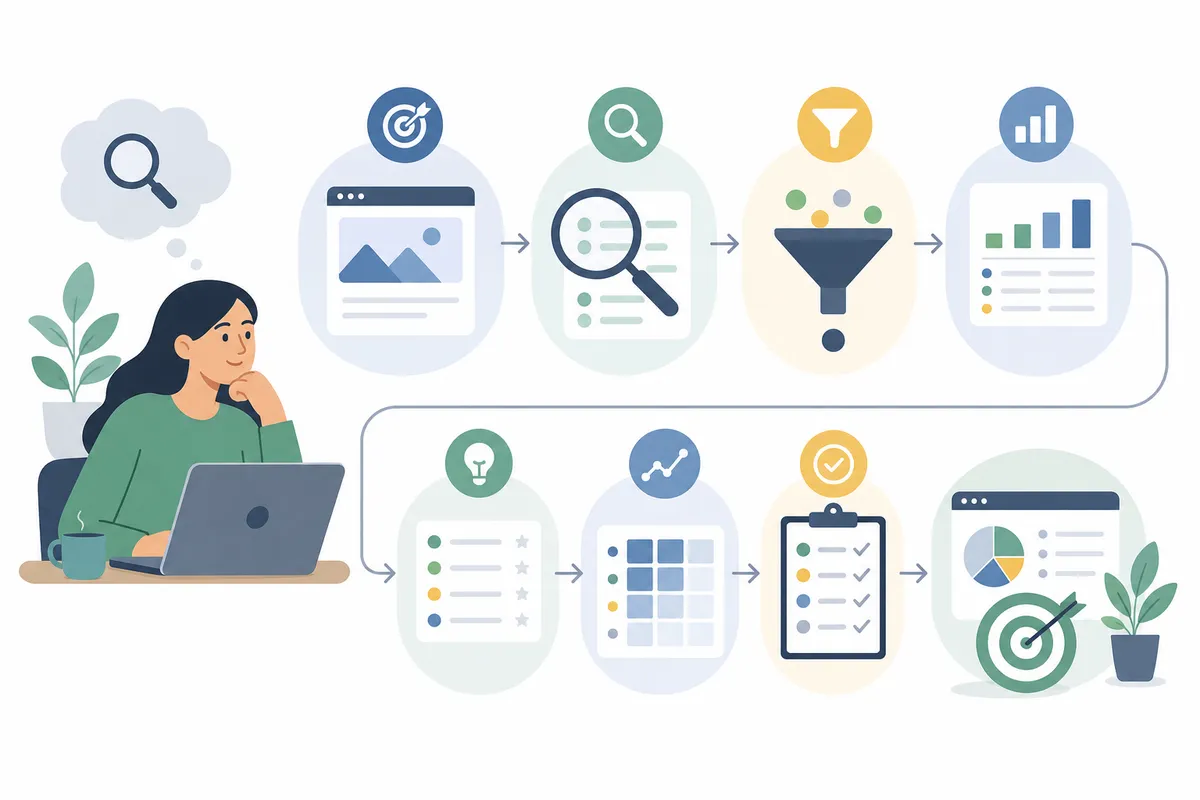
Here's the full workflow at the heart of this keyword research guide, in order. You can complete a first pass for a small site in an afternoon.
Step 1: Brainstorm seed keywords
Seed keywords are the broad terms that describe what you do. Every tool starts from them. To generate yours, answer these questions:
- What products, services, or topics does your site cover?
- What words would a customer use — not the words your industry uses internally?
- What problems does your offer solve?
If you sell coffee equipment, your seeds might be "french press," "espresso machine," "coffee grinder." If you run a hiking blog, they're "hiking trails," "hiking boots," "backpacking." Don't overthink this list. Five to ten seeds is plenty; the tools will do the expansion.
One warning from experience across thousands of campaigns: what you want to rank for and what your audience actually searches are often two different things. A florist may describe their work as "floral design services," while customers search "wedding bouquets" and "bridal flowers." Start from the customer's language, not your own.
Step 2: Expand your seeds into hundreds of ideas
Feed each seed into a keyword tool and let it generate variations, related terms, and questions. A dedicated tool such as SearchBlueprint's free keyword suggestions tool for long-tail ideas will turn one seed into a long list of specific phrases people actually type — including the question-format queries that make excellent blog topics.
Supplement the tool output with these free sources:
- Google Autocomplete. Type a seed into Google and note the suggestions. These are real, popular queries.
- People Also Ask boxes. The question boxes on any results page reveal the sub-questions searchers care about.
- Related searches. The links at the bottom of the results page suggest adjacent phrasings.
- ChatGPT or Claude. Ask for ten keyword ideas per seed topic. AI brainstorming is fast, but it gives no real search data — always verify volume afterward with an SEO tool.
- Google Trends. Useful for spotting rising topics and seasonality, though it shows broad topics rather than specific keyword ideas.
At this stage, collect generously. You'll filter later. A list of 100–300 candidate keywords is a healthy starting point for a new site.
Step 3: Find keywords you already rank for
If your site already exists, it's almost certainly ranking for terms you never deliberately targeted. These are your fastest wins, because moving from position 15 to position 5 is far easier than ranking a new page from scratch.
Google Search Console is the primary source. Open the Performance report, view the Queries tab, and set the date range to the last 90 days. Sort by impressions and look for queries with many impressions but few clicks — Google already considers you relevant for these; a targeted content update can capture the clicks.
Bing Webmaster Tools is the equivalent for Bing, and worth checking if Microsoft's ecosystem matters in your market. Its search keywords report can be exported with data from the last 180 days, and its AI performance reporting shows which queries trigger Copilot answers that cite your pages — an early window into your AI-search visibility.
The limitation of Search Console is that it shows no volume or difficulty data. If a keyword sends you three clicks a month, you can't tell whether it gets 10 searches or 10,000. That's why the analysis stage (below) matters: you take these query exports and enrich them with real metrics.
Step 4: Study your competitors' keywords
Your competitors have already done keyword research — piggyback on it. The process:
- Google your seed keywords and note which sites rank on page one repeatedly. These are your search competitors, which often differ from your business competitors. Ignore giants like Amazon or Wikipedia; look for sites at roughly your size and focus.
- Review their top content. What topics do they cover? Which pages appear for multiple queries? Those pages point to proven demand.
- Look for gaps. Topics your competitors rank for that you haven't covered are ready-made additions to your list. Topics none of them cover well are your best openings.
Repeat with three to five competitors and your keyword list will grow substantially — all of it pre-validated, because someone is already earning traffic from these terms.
Step 5: Listen to real people
Tools work from historical search data, which keeps you inside the box. To find topics before they show up in databases, go where your audience talks:
- Reddit and niche forums. A thread with dozens of upvotes signals demand, even if the matching keyword shows modest volume. The Ahrefs guide gives a good example: "aeropress coffee to water ratio" gets only around 150 monthly searches, but a Reddit thread on the topic drew 42 upvotes — clear proof people value the answer.
- YouTube and TikTok comments. Comment sections on topic-relevant videos are full of unanswered questions phrased in the audience's own words.
- Sales calls and support tickets. First-party data is gold. If prospects ask the same question in every demo, or 20 support tickets raise the same issue, that's a keyword opportunity regardless of what any tool reports. Content answering pre-purchase questions helps prospects decide and reduces support load at the same time.
Keywords from these sources sometimes show zero volume in tools. Target them anyway when the underlying need is real — tools sample and round, and conversational AI queries often never register in traditional volume databases.
How to Analyze Keywords: Volume, Difficulty, and Intent
Finding keywords is the easy half. Analysis is where beginners separate the 20 keywords worth targeting from the 280 that aren't. Every keyword has an anatomy — a set of measurable traits — and you should check all of them before committing to a page.
| Metric | What it tells you | How to use it | Watch out for |
|---|---|---|---|
| Monthly search volume | How many times per month the keyword is searched | Size the traffic opportunity; compare variants to find the popular phrasing | High volume often means high competition and vaguer intent |
| Keyword difficulty | How hard the current top results are to outrank | Filter out terms beyond your site's current authority | Scores vary between tools; treat them as relative, not absolute |
| Search intent | What the searcher actually wants (learn, compare, buy, navigate) | Match your content format to the intent, or you won't rank | One keyword can carry mixed intent — check the live results page |
| Business value | How likely a ranking is to produce revenue or leads | Prioritize keywords close to a purchase decision | Traffic with no path to conversion is a vanity metric |
| SERP structure | Which features (AI Overviews, snippets, maps, videos) occupy the page | Estimate how many clicks actually reach organic results | A page crowded with features leaves less room for your listing |
Search Volume Research: Reading the Numbers Correctly
Search volume is the average number of monthly searches for a keyword. It's the metric beginners over-trust most, so keep three caveats in mind.
First, volume is an average, and many keywords are seasonal. "Christmas box," for instance, spikes from October through December in the UK — plan seasonal content months ahead, not the week demand peaks.
Second, high volume often signals ambiguous intent. Someone searching "shoes" could want history, pictures, or a purchase; someone searching "best price red womens size 7 running shoe" practically has their wallet out. Volume alone tells you nothing about which visitor you'll attract.
Third, free ad-platform data is coarse. Google Keyword Planner groups close variants together and shows only broad ranges (like 1K–10K) unless you're spending on ads, and its competition column reflects PPC bidding, not organic difficulty. For SEO decisions, use an SEO-specific source. A fast option is SearchBlueprint's free keyword checker showing volume, difficulty, and intent, which returns all three core metrics for any term in one lookup — exactly the enrichment your Search Console exports and brainstormed lists need.
Keyword Difficulty: Picking Battles You Can Win
Keyword difficulty (KD) estimates how hard it is to crack the top results, usually on a 0–100 scale based mainly on the strength of pages currently ranking. Practitioners commonly use a working filter of roughly 0%–49% difficulty for realistic targets, adjusted to the site's own authority — a brand-new site should stay at the low end, while an established one can push higher.
| Difficulty band | What it means | Who should target it | Typical timeline |
|---|---|---|---|
| Low (roughly 0–20) | Weak or thin competition in the top results | New sites and beginners; your primary hunting ground | Rankings can appear within weeks to a few months |
| Medium (roughly 21–49) | Established pages rank, but gaps exist | Sites with some authority and a growing content base | Several months of content and internal linking |
| High (50+) | Strong brands dominate the top 10 | Authoritative sites with backlink resources | Often a year or more of sustained effort |
Big brands frequently occupy the entire top 10 for high-volume head terms. If you're just starting out and chase the same keywords, the uphill battle can take years. There's no prize for ranking 47th for "shoes." There's real revenue in ranking 3rd for a specific long-tail term your competitors ignored.
One more nuance: difficulty scores measure link-based competition, but the results page itself adds friction. If a query triggers an AI Overview, a featured snippet, a map pack, and a video carousel, the traditional organic listings are pushed far down — factor that into whether the keyword is worth the fight.
Search Intent: The Make-or-Break Check
Search intent is the reason behind the query. Google's Quality Rater Guidelines describe four broad intents — know (find information), do (accomplish a goal), website (reach a specific site), and visit-in-person (find a local business) — and Google's entire ranking approach revolves around satisfying them. If your content format doesn't match the intent, you won't rank no matter how good the writing is.
| Intent type | Signal words in the query | Content that ranks | Example keyword |
|---|---|---|---|
| Informational | how, what, why, guide, tutorial | Blog posts, guides, videos, FAQs | "how to do keyword research" |
| Commercial investigation | best, top, review, vs, comparison | Comparison posts, reviews, buyer's guides | "best free keyword tools" |
| Transactional | buy, price, discount, near me, hire | Product, service, and pricing pages | "seo audit service pricing" |
| Navigational | brand or product names | The brand's own pages | "google search console login" |
The reliable way to confirm intent: search the keyword and study what already ranks. If the top five results are listicles, Google has decided searchers want a listicle — publishing a product page for that term is swimming against the current. Match the dominant format, angle, and depth, then improve on it.
Business Value: The Filter Tools Can't Apply for You
Before a keyword makes your final list, ask four quick questions. Will ranking for it build brand awareness with the right audience? Could it improve your visibility in AI-generated answers? Will it attract leads? Could it drive purchases directly? A keyword should earn a "yes" to at least one. Relevance matters too: a furniture retailer targeting basketball-rules keywords would confuse both users and Google, and the traffic would convert at essentially zero. High-volume irrelevance loses to modest-volume relevance every time.
The Long Tail: Where Beginners Actually Win
If this keyword research guide leaves you with one tactical takeaway, make it this: build your early strategy on long-tail keywords.
What counts as long-tail
A long-tail keyword typically has three traits: it's three or more words long, it has lower search volume paired with lower competition, and it's specific enough that engagement and conversion rates run higher. "Hiking" is a head term. "How long does it take to walk the Appalachian trail" is long-tail. "How many calories does hiking burn" is long-tail. Each answers one precise question one identifiable person is asking.
Why they outperform head terms for new sites
The popular head terms only account for a fraction of total searches — Moz's beginner guide describes the remaining roughly 75% of search demand as living in the "chunky middle" and "long tail." Individually these queries look small. Collectively they represent the majority of opportunity, and they're the portion your site can actually win in its first year. Long-tail visitors also convert better, because a specific query signals a searcher who knows exactly what they need.
One post, many long-tails
Don't fall into the trap of one blog post per long-tail keyword. There's an almost infinite number of long-tail combinations for any topic, and creating a thin page for each would be impossible — and would read as low-quality to Google's systems. Instead, group closely related long-tails into a single comprehensive page. A thorough article on "keyword difficulty" can naturally rank for "what is keyword difficulty," "how is keyword difficulty calculated," and "what keyword difficulty should I target" without treating each as a separate project. The clustering rule of thumb: if two keywords show the same pages in their top results, one page can rank for both. If the results differ substantially, they need separate pages.
Choosing Keyword Research Tools: Free vs. Paid
You don't need a paid subscription to start. Here's how the common options compare for a beginner in 2026.
| Tool type | Cost | Best for | Main limitation |
|---|---|---|---|
| Google Search Console | Free | Finding queries your site already ranks for, with real click data | No volume or difficulty metrics; queries only, no new ideas |
| Google Keyword Planner | Free (Google Ads account required) | Bulk keyword ideas from seeds | Volumes shown as broad ranges unless you run ads; competition column reflects PPC, not SEO |
| Google Trends | Free | Spotting seasonality and rising topics | Broad topics only, no specific keyword ideas or difficulty |
| Free SEO checkers (e.g., volume/difficulty and suggestion tools) | Free | Getting real SEO metrics — volume, difficulty, intent — without a subscription | Per-lookup workflow rather than bulk exports |
| AI assistants (ChatGPT, Claude) | Free tiers available | Fast brainstorming and mining pasted forum/comment threads for keyword ideas | No real search metrics; every idea needs verification in an SEO tool |
| Paid SEO suites | Subscription | Bulk research, competitor gap analysis, rank tracking at scale | Cost; overkill until your keyword list outgrows free workflows |
The honest guidance from this keyword research guide: start free. Search Console plus a free suggestions tool and a free volume-and-difficulty checker covers the full beginner workflow. Upgrade to a paid suite when you're managing hundreds of keywords across multiple projects and the manual workflow becomes the bottleneck — as one popular guide puts it, if your website makes money in any way, a professional toolset is an investment that returns value. Until then, it's an expense you don't need.
Prioritizing and Using Your Keywords
You now have a filtered list of relevant, realistic, searched-for keywords. Two steps remain: deciding order of attack, and mapping keywords to pages.
A simple prioritization framework
Score each keyword on three axes and work down the list:
- Business value first. Keywords closest to a purchase or lead — service terms, comparisons, pricing questions — get built before purely informational ones, even at lower volume.
- Winnability second. Among high-value terms, start with the lowest difficulty. Quick wins build authority that makes harder terms winnable later. Existing rankings sitting on page two (positions 11+) are the quickest wins of all — check them first.
- Volume third. Between two keywords of equal value and difficulty, take the bigger one.
Competitor overlap adds a strategic layer. Targeting valuable keywords your competitors haven't covered exploits their missed opportunities; targeting the ones they already rank for is the aggressive play that puts you in direct competition. Most sites should mix both.
Map every keyword to one page
Entire websites don't rank for keywords — individual pages do. So assign each priority keyword (plus its cluster of close variants) to exactly one page: the primary keyword goes in the title, the H1, the opening paragraph, and a couple of subheadings, and the variants flow naturally through the body. Never point two pages at the same primary keyword; they'll compete with each other and Google will rank neither well.
Then track the outcome. Keyword research isn't a one-time task — revisit your list quarterly, check which pages moved, and feed new query data from Search Console back into the process. If you want to see what a structured output of this whole workflow looks like in practice, this sample SEO report shows how keyword targets, difficulty, and page mapping come together into an actionable plan.
Common Keyword Research Mistakes to Avoid
Five errors account for most beginner failures — and every one is avoidable with the steps in this keyword research guide:
- Chasing volume over intent. A 20,000-search head term that never converts is worth less than a 200-search long-tail that does.
- Ignoring difficulty. New sites targeting 70+ difficulty keywords burn months for nothing. Stay in your winnable band and expand as authority grows.
- Guessing intent instead of checking the SERP. Two minutes looking at what currently ranks prevents publishing the wrong format entirely.
- One keyword, multiple pages. Cannibalization splits your ranking signals. One primary keyword, one page.
- Treating research as a one-off. Search demand shifts, competitors publish, AI features reshape results pages. A quarterly refresh keeps your strategy pointed at live demand.
FAQs
How do I do keyword research for SEO as a complete beginner?
Start with 5–10 seed terms describing your business, expand them using a free suggestions tool plus Google Autocomplete and People Also Ask, then check each candidate's monthly volume, difficulty, and intent. Keep keywords that are relevant, realistically rankable for your site, and tied to business value, and assign each one to a single page.
What is the best way to find keywords for a new website?
Focus on long-tail keywords — specific phrases of three or more words with low difficulty scores. New sites lack the authority to compete for head terms, but long-tails face weaker competition, convert better, and collectively represent the larger share of total search demand. Competitor analysis speeds this up: keywords smaller rivals already rank for are pre-validated opportunities.
How do I analyze search volume and keyword difficulty?
Run the keyword through an SEO tool that reports both metrics. Read volume as an average that hides seasonality and intent ambiguity, and read difficulty as a relative score — a common beginner filter is difficulty in the 0–49% range, adjusted to your site's authority. Always pair the numbers with a manual look at the live results page to confirm intent and SERP features.
Is keyword research still worth doing now that AI answers search queries?
Yes — the goal has shifted, not disappeared. AI Overviews absorb clicks on broad informational queries, so modern research weights business value, conversational question keywords, and comparison terms more heavily than raw volume. Google's own guidance is unchanged: keep content crawlable and create helpful, people-first pages, which starts with knowing what people actually ask.
How many keywords should one page target?
One primary keyword per page, supported by a cluster of close variants and related long-tails that share the same intent. If two keywords show largely the same top results, one page can rank for both; if the results differ substantially, they deserve separate pages. Never aim two pages at the same primary term.
Run Your First Keyword Analysis Today
Pick three seed keywords for your site right now and push them through this keyword research guide's workflow: expand, check volume and difficulty, confirm intent on the live results page, and map the best candidates to pages. A focused hour of keyword research this week will shape months of content — and it's the difference between publishing into the 90% of pages that earn nothing and building pages that people actually find.
Related reading: Understanding Keyword Difficulty: How to Pick Winnable Keywords.
Sources
- How to Do Keyword Research for SEO (Start to Finish)
- [Keyword Research Beginner's Guide to SEO)
- How to do keyword research in 2026 (6 ways + framework)
- [Keyword Research for SEO: The Beginner's Guide 2026)
- What is Keyword Research? A Complete Guide - Conductor
About the author
SearchBlueprint researched, wrote and scored this article with the content pipeline our customers run on their own sites. The score in the byline is what our content engine gave this page before it published. Nothing here is reviewed by hand, which is the point: it is the product's output, published where anyone can check it.