Are internal links good for SEO? How they help you rank
SearchBlueprint · · 14 min read · scored 95/100

Are internal links good for SEO? Yes. They help Google find your pages, show which pages matter most, pass authority from strong pages to weaker ones and tell search engines what each page covers. They only help, though, when they point to useful pages with clear anchor text.
This guide is for anyone who runs or writes for a website, from small business owners to in-house marketers and agency SEOs. It explains what internal links do and which mistakes cancel out the benefit. It also shows how to plan your links and how to audit the ones you already have.
What counts as an internal link?
An internal link is a hyperlink from one page on your domain to another page on the same domain. A link in a blog post that points to your pricing page is internal. So is the "Contact" item in your menu.
Two other link types often get mixed up with it:
- External links go from your site to another domain, such as a study you cite.
- Backlinks come from another domain to yours. You earn them. You don't place them.
You control internal links completely, and that is what makes them so useful. You can't make another website link to you. You can decide today which of your own pages get attention.
The main types of internal links
Not every internal link does the same job. Yoast's guide groups them into navigational, contextual, footer and sidebar links. Siteimprove adds image links and call-to-action links. Here is what each type does for SEO.
| Link type | Where it sits | What it does for SEO | Best used for |
|---|---|---|---|
| Navigation links | Header menu on every page | Signal your most important sections sitewide | Core pages such as services, pricing, blog and contact |
| Contextual links | Inside the body copy | Show how topics relate and carry the most descriptive anchor text | Connecting related articles and sending readers to money pages |
| Footer links | Bottom of every page | Keep utility and policy pages crawlable | Privacy policy, terms, HTML sitemap and contact details |
| Sidebar and related-post links | Beside or below the content | Cut the clicks needed to reach deeper pages | Popular posts, related articles and categories |
| Breadcrumb links | Above the page title | Show where a page sits in your site hierarchy | Blogs, online shops and any site with categories |
| Image and button links | Anywhere on the page | Pass value like a text link, with the image alt text acting as the anchor | Calls to action and product thumbnails |
Contextual links usually do the most SEO work. They sit inside the text that explains why two pages are related. Readers and crawlers get the reason for the link along with the link itself.
Why internal links are good for SEO
Internal links do several jobs at once. Some help search engines understand your site. Others help people find what they came for. Google has said as much. As quoted in Yoast's internal linking guide, dated November 12, 2025, Google Search Advocate John Mueller called internal linking "one of the biggest things that you can do on a website to kind of guide Google and guide visitors to the pages that you think are important."

They help Google find your pages
Google finds most new pages by following links from pages it already knows. Google Search Central documents this and asks site owners to make links crawlable. That means a standard <a> element with an href attribute. A link that only works through a JavaScript click event may never be followed.
A page nothing links to becomes an orphan. Siteimprove notes that orphaned pages can be ignored even when they sit in your XML sitemap. The logic is simple. If you never linked to a page yourself, it doesn't look important.
They show which pages matter most
Your link structure is a signal in its own right. Say your homepage links to category pages, and each category links to its products or posts. That builds a clear path: homepage, then category, then detail page. It tells Google which pages are central and which ones support them.
Volume matters too. Siteimprove reports that URLs with only a few internal links see very few clicks from Google Search on average. URLs with dozens of internal links, counting navigation and sitewide links, can see many more.
They pass authority from strong pages to weak ones
Pages that earn backlinks build up authority, often called link equity or PageRank. Your homepage usually holds the most, because it attracts the most backlinks. Every internal link shares some of that value with the page it points to.
This is how you lift a page that other sites will rarely link to, such as a service page or a product category. Link to it from your strongest posts, and it picks up some of their strength.
Anchor text tells Google what a page is about
Anchor text is the clickable wording of a link. "Office cleaning prices in Chicago" tells Google and the reader exactly what sits on the other end. "Read more" tells them nothing. Google's link guidance asks for anchor text that is descriptive, reasonably short and relevant to the page it points to.
They keep readers moving toward a decision
Readers rarely find everything on the first page they land on. A well-placed link to the next logical page keeps them on your site instead of sending them back to the results. Someone who finishes a keyword research post may want a step-by-step on-page SEO checklist next. Someone reading a pricing FAQ probably wants the pricing page. Each click is a step toward a sign-up or a sale, and it's a step you planned.
They help AI search tools connect your topics
AI answer tools such as Google's AI Overviews, ChatGPT and Perplexity pull from pages they can read and connect. Yoast and seoClarity both argue that clear internal linking helps AI-driven search understand how topics relate across a site. When related articles link to each other and to one central guide, it's clearer which subjects you cover in depth. It's also clearer which page is your main resource on each one.
When internal links stop being good for SEO
Internal links aren't good by default. Placed carelessly, they waste crawl time, confuse readers and spread authority thin. Sure Oak puts it plainly: too many internal links hurt a site, just as too few make content hard to find.
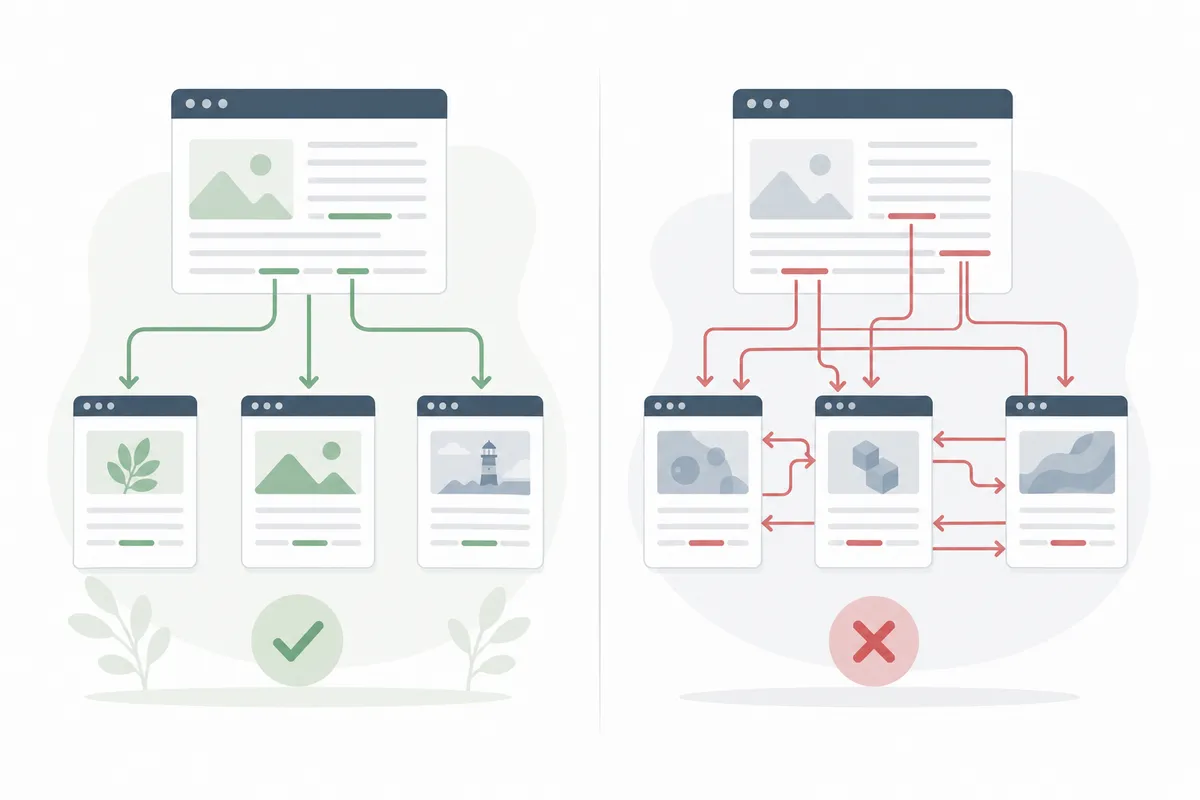
These are the problems that show up most often when you crawl a site:
| Mistake | What goes wrong | How to spot it | How to fix it |
|---|---|---|---|
| Orphan pages | Google may never find or index the page | The page is in your CMS or sitemap, but no other page links to it | Add contextual links from two or three related pages, or remove the page if nobody needs it |
| Broken internal links | Readers and crawlers hit a 404 dead end | A crawler or Search Console lists links to missing URLs | Point the link at the correct live URL, or remove it |
| Links through redirects | Each extra hop wastes crawl time and slows the click | A crawl shows internal links returning 301 or 302 status codes | Update the link to the final destination URL |
| Redirect chains and loops | Crawlers may stop following, and a loop never resolves | One URL redirects to another that redirects again | Collapse the chain to a single redirect and update the links |
| Generic anchor text | Google learns nothing about the linked page | Anchors such as "click here", "this post" or "read more" | Rewrite the anchor to describe the destination |
| One exact-match anchor everywhere | The pattern looks engineered rather than natural | Every link to a page uses the same keyword phrase | Use several natural phrasings of the same idea |
| Hundreds of links on one page | Each link counts for less, and readers get lost | Link counts far above what similar pages carry | Keep only the links a reader would actually use |
| Key pages buried deep | Pages more than three clicks from home may be treated as lower priority | A crawl-depth report shows important pages at depth four or more | Link to them from the homepage, hub pages or popular posts |
One more trap: adding rel="nofollow" to internal links to hold back authority. Siteimprove points out that Google treats nofollow as a hint. The value you hold back isn't handed to the other links on the page either. On most sites, removing an unwanted link works better than nofollowing it.
Linking errors rarely show up alone. If a crawl turns up several of the issues above, work through the most common SEO mistakes and how to fix each one at the same time. Broken links often sit next to thin pages and missing titles.
How to build an internal linking strategy
A good internal linking plan doesn't need special software. It needs a clear picture of your site and a habit you repeat every time you publish.

Map your site structure first
List your top-level pages: home, your main services or product categories, the blog, about and contact. Then list what sits under each one. Every important page should be reachable within three clicks of the homepage. Sure Oak and Siteimprove both give that rule of thumb. Internal linking is one part of a wider review, and a website SEO checklist of 46 checks shows where it fits among the technical and content work.
Group content into topic clusters
Pick one broad pillar page per topic. Then write several supporting articles that each answer one narrow question. Every supporting article links back to the pillar. Supporting articles also link to each other where a reader would want the next one.
Siteimprove's example makes this concrete. A marketing agency has a pillar page on content marketing strategy. Its supporting posts cover building a content calendar, distribution tactics and repurposing blog posts. The links between them tell Google the pillar is the main resource and the rest support it.
Link from strong pages to the ones you want to rank
Find the pages that already get the most traffic or backlinks. Those are your donor pages. Add a contextual link from each donor to a page that needs help, such as a new service page or a guide stuck on page two. It's often the quickest lever you have, because it uses authority you've already earned.
Write anchors a reader would trust
Describe the destination in a few words. Then vary the wording across your site. Link to your pricing page as "our pricing" in one post, "what a plan costs" in another and "compare plans" in a third. Natural sites use several phrasings for the same page, and yours should too.
Place links where people actually read
Siteimprove recommends putting links high on the page, where readers and crawlers meet them early. A link inside a sentence that explains why it matters beats a "related posts" box nobody scrolls to. Keep the number modest so each one stands out.
Link every new page from older ones
A new article starts life with no internal links pointing to it. Before you publish, add links to it from two or three older, related pages. Link out from it to your pillar as well. Make this part of your publishing routine, alongside the 27 on-page checks worth running before a post goes live.
How to audit the internal links you already have
Most sites already have hundreds of internal links, and some have broken since they were added. An audit finds them. Run the checks in this order. Fixing broken links and redirects first gives you a clean crawl to judge everything else against.
Step 1: fix broken links and redirects
Crawl the site and export every internal link that returns a 404, a server error or a redirect. Point each one straight at the final live URL. This is the fastest win in any audit, and it restores value that was leaking away.
Step 2: find orphans and buried pages
Compare the pages in your CMS or sitemap with the pages your crawl actually reached. Anything the crawl missed is likely an orphan. Then sort the crawl by click depth. Pull out important pages sitting four or more clicks from the homepage, and give each one a link from a hub or a popular post.
Step 3: trim and rewrite
Look for pages with far more links than similar pages carry, and cut the ones no reader would click. Then scan your anchor text for "click here", "read more" and any single keyword phrase repeated across dozens of links. Rewrite those as you go. If you want every check in sequence, the SEO audit checklist in the right order puts internal linking in context with indexing, speed and on-page work.
Tools that help
- Google Search Console is free. Its Links report shows your most-linked pages, and its page indexing report flags URLs Google found but didn't index.
- Yoast SEO is a WordPress plugin, and its internal linking suggestions come with the Premium version. Yoast says the plugin is trusted by 13M+ site owners, and its site lists a rating of 4.8 out of 5 from 27,819 users.
- A site crawler lists every link on your site with its status code, anchor text and click depth.
- SearchBlueprint suggests internal links drawn from a crawl of your own site, so you start from the pages you actually have.
How often to audit
Sure Oak recommends an internal link audit at least once every six months, and whenever you make significant changes to your site. A redesign, a URL change or a merge of several pages can break many links at once. Audit straight after any of them.
Can you handle internal linking yourself?
Yes, on most small and mid-sized sites. Internal linking needs no code, no budget and no access beyond your CMS. The work is mostly judgment: which pages matter, and which ones a reader would want next. You know your business and your customers, so you're well placed to make those calls.
Doing it yourself usually works when:
- your site has up to a few hundred pages
- you publish regularly and can add links as part of each new post
- your URLs rarely change
It's worth getting help when:
- the site runs to thousands of pages, where seoClarity notes internal links can turn disorganized without a clear plan
- you're moving to a new platform or changing your URL structure
- an online shop creates many filter and sort URLs
- rankings fell after a redesign and you can't see why
A good place to start is 25 free website checks you can run yourself. Work through them first, and you'll have a better sense of whether you're facing simple link fixes or a job for a specialist.
How long before internal links show results?
Discovery can be fast. When Google recrawls a page that now links to your new URL, it can find the new page on that same visit. How often that happens depends on how often Google crawls your site, and that varies from site to site.
Ranking changes take longer and vary more. Google has to recrawl the pages involved, process the new links and reassess the pages they point to. No honest source can promise a fixed timeline, so be wary of anyone who does. Track the target page's impressions and average position in Search Console over the following weeks. If nothing moves, run a fast SEO audit to find what's broken before you add more links. A bigger problem may be holding the page back.
FAQs
Are internal links good for SEO on a small site?
Yes. On a small site every page sits close to the homepage, so a few well-placed contextual links can make sure each page gets found. They also give your most important pages extra support. The work is quick, too, because there are fewer pages to map.
How many internal links should a page have?
There's no fixed number. Link where a reader would want to go next. A long guide will naturally carry more links than a short post. Cut back when a page carries far more links than similar pages on your site, or when links point to off-topic content.
Do internal links count as backlinks?
No. Backlinks come from other domains and act as outside votes of confidence. Internal links come from your own site. They move authority between your pages, but they don't add new authority to the site as a whole.
Should internal links open in a new tab?
Usually not. Readers expect internal links to open in the same tab, and that keeps the back button working. There's no known ranking benefit to a new tab either way, so follow what's easiest for your visitors.
Is it bad to use the same anchor text for every link to a page?
It can be. Repeating one exact-match phrase on every link looks engineered. Use a few natural phrasings that describe the same page, and let the surrounding sentence carry the context.
Run an internal link check on your own site
Are internal links good for SEO on your site right now, or are some of them broken, buried or pointing at pages that no longer exist? The sample SEO report shows what a finished audit looks like, with each issue tied to the pages it affects. Look through it, then talk to the team about running the same check on your site.
Resources / References
Related reading: Internal Linking: How It Works and Why It Drives Rankings.
Sources
- Please explain Internal Linking like I am 5 years old.
- The ultimate guide to internal linking for SEO and GEO
- 7 Benefits of Internal Linking in SEO
- Why an Internal Linking Strategy Is Critical for SEO
- Your Internal Linking Blueprint For Better SEO
Disclaimer: This article is general information about rules and figures that applied when it was written, not personalised financial, tax or investment advice. It does not take account of your income, obligations, risk tolerance or goals, and rates and thresholds change. Verify the current position with the relevant authority, and speak to a licensed adviser or a qualified accountant before acting.
About the author
SearchBlueprint researched, wrote and scored this article with the content pipeline our customers run on their own sites. The score in the byline is what our content engine gave this page before it published. Nothing here is reviewed by hand, which is the point: it is the product's output, published where anyone can check it.