SEO Automation Workflows That Publish in Days, Not Weeks
SearchBlueprint · · 11 min read · scored 92/100
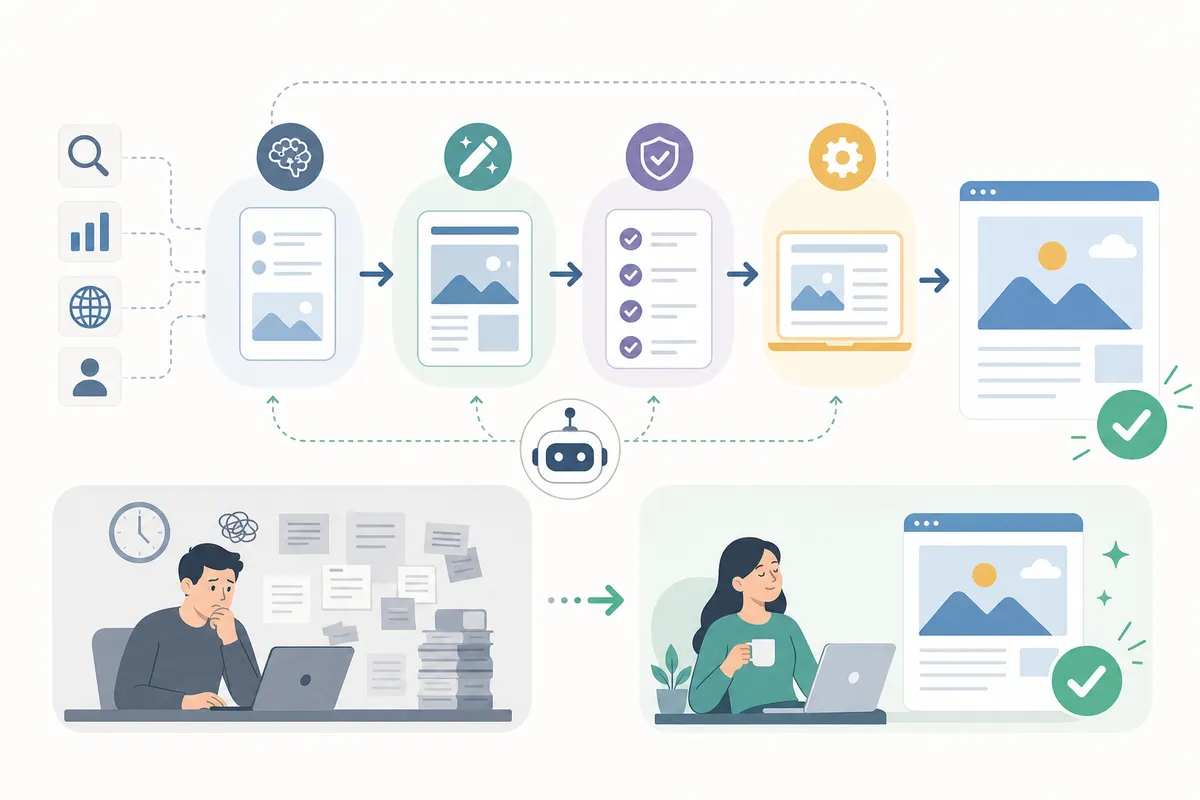
SEO automation workflows are repeatable systems that hand keyword research, briefs, technical checks, and reporting to software while people keep strategy and editing. Teams that run them report brief creation dropping from 2-3 hours to about 30 minutes, and total publish times falling from more than two weeks to 3-5 days per asset.
The catch: automation only pays off when you pick the right tasks to hand over. Automate the wrong ones and you ship faster, worse content that Google's spam policies were written to catch.
Key Takeaways
- A workflow connects research, briefs, production, technical checks, and reporting into one system. A pile of disconnected tools automates tasks, not outcomes.
- The biggest measured gains sit in coordination, not writing. monday.com's workflow guide puts time-to-publish at 3-5 days with structure, against 2+ weeks ad hoc.
- Keep strategy, keyword selection, and final editing human. Practitioners who automate heavily still report doing both themselves.
- Budget from real list prices: workflow builders like Gumloop list a free plan, then $37 a month, with team plans listed at $244 a month.
- Start with one bottleneck, measure the before state, and expand only after the first workflow holds quality.
What an SEO automation workflow actually is
An SEO automation workflow is a defined sequence of steps, from keyword data to a live page, where software runs the repetitive stages and a person signs off on the judgment calls. The word that matters is workflow. A rank tracker is a tool. A system where a ranking drop triggers a re-crawl, opens a task with the affected URLs attached, and lands a refresh brief in a writer's queue is a workflow.
That distinction explains why so many teams own good software and still miss deadlines. The tools each save an hour somewhere, but nothing carries work from one stage to the next. Handoffs happen by email, requirements live in someone's head, and tracking gets bolted on weeks after publication. Deciding what to automate and what not to is the design step most teams skip, and it is the one that determines whether automation compounds or just shifts the bottleneck.

Why structured workflows beat ad-hoc SEO
The gap between task-based SEO and workflow-based SEO shows up in hours, not theory. In a task-based model, success depends on individual memory: a writer might remember internal links, a developer might add schema if prompted. It works at small volume and breaks under pressure.
monday.com's SEO workflow guide quantifies the difference stage by stage:
| Production stage | Ad-hoc process | Structured workflow | Why the gap exists |
|---|---|---|---|
| Brief creation | 2-3 hours researching from scratch | 30 minutes using data-populated templates | Templates carry keyword data, intent, and requirements in from the start, so nobody rebuilds context per asset |
| Review cycles | 3-5 days of email back and forth | 1-2 days with centralized comments | Status changes trigger the next reviewer instead of waiting on someone to chase a thread |
| Technical setup | Done manually after publication | Built into a pre-publish checklist | Schema, metadata, and tracking ship with the page rather than getting patched in later |
| Total time-to-publish | 2+ weeks per asset | 3-5 days per asset | Fewer handoffs, and none of them depend on memory |
Those figures compound across a content calendar. At two assets a week, the difference between the two rows is roughly a month of production capacity every quarter. For agencies billing on retainers, that capacity is margin, which is the core case for investing in SEO automation as an agency: the same headcount serves more clients without the quality bar moving.

The six stages of an SEO automation workflow
Mature SEO automation workflows cover the same six stages. What varies is how much of each stage runs on software.

1. Keyword research and clustering
Automate the data pulls: search volume, CPC, and SERP features flowing into a sheet or database without anyone copying cells. Automate clustering too, since grouping hundreds of terms by intent is pattern work machines do well. Vendors are pushing hard here; Siteimprove cites 63% of local SEO platforms rolling out AI-based keyword suggestions in 2024. Keep the final selection human. Marketer Milk's Omid G, who automates aggressively, draws exactly this line: keyword analysis is automated, keyword research stays "very human." Volume data cannot tell you which topic serves your business.
2. Content briefs
The brief is the contract between strategy and execution, and it is half automatable. Tools scan the top-ranking pages, extract their structure, and populate a template with target terms, word counts, and competitor gaps. Omid G reports brief tools handle about 50% of the work, with his own insights filling the rest. That matches the monday.com figure above: 30 minutes with templates against 2-3 hours from scratch. The automated half is research assembly. The human half is the angle, and the angle is what ranks.
3. Drafting and editing
The most tempting stage to automate fully, and the most dangerous. AI-assisted drafting works when it drafts against a researched brief and a human edits the result. Fully automated publishing, prompt to live page with nobody reading it, is how sites fill up with confident filler. Google's guidance on AI-generated content draws the same line: how content is produced matters less than whether it exists primarily to manipulate rankings. There is a working middle path for scaling article production without the slop: automate the draft, the formatting, and the proofreading pass, and gate publication behind a person. Omid G runs an AI agent that proofreads posts he wrote himself, which is automation serving the writing rather than replacing it.
4. On-page and technical checks
This stage should be almost entirely automated. Crawlers map broken links, duplicate content, and redirect chains on a schedule. Metadata checks and schema validation against the schema.org standard belong in a pre-publish checklist, not a post-launch cleanup. The payoff is speed of detection: an automated monitor flags a broken canonical within hours, where a manual audit might catch it next quarter.
5. Internal linking and publishing
Link suggestions drawn from your own crawl beat guesswork, because they come from pages that actually exist. Automation surfaces the opportunities; a person approves anchors so every page does not repeat the same exact-match phrase. Publishing deserves one more automated step that most teams skip: verification that the page is actually reachable at its URL. A successful CMS write is not a live page.
6. Monitoring, reporting, and refresh
Rank tracking, traffic alerts, and content decay detection close the loop. When a page slips, the workflow should open a refresh task automatically, with the ranking history attached, rather than waiting for a quarterly review to notice. Client reporting is the classic first automation for agencies: a scheduled dashboard replaces hours of monthly screenshot assembly.
What to automate and what to keep human
The pattern across every stage: machines handle data and repetition, people handle judgment and anything a customer reads. Here is the split, task by task:
| Task | Automate it? | Why |
|---|---|---|
| Data pulls (volume, rankings, CPC) | Yes, fully | Software is faster and makes no transcription errors, and no judgment is involved in the output |
| Site crawls and technical monitoring | Yes, fully | Continuous detection beats periodic audits; a broken link found in hours costs less than one found in months |
| Topic clustering | Yes, with review | Grouping at scale is pattern work, but a machine cannot know which cluster maps to revenue |
| Content briefs | Partially | Practitioners report automation covers about half the work; positioning and angle stay human |
| Drafting | Partially | AI drafts against a researched brief are workable; unreviewed publishing is not |
| Final editing and fact checks | No | This is the last gate before your brand says something wrong in public |
| Strategy and keyword selection | No | Business context lives with people, and every practitioner source draws this same line |
| Outreach first contact | No | Automated prospect lists work; automated relationship-building reads as the template it is |
Two failure modes are worth naming. The first is automating judgment: letting a tool pick your keywords or publish unread drafts. Google's spam policies in Search Essentials cover scaled content produced primarily to manipulate rankings, however it was produced, so volume without oversight is a risk rather than a strategy. The second is subtler: automation that quietly degrades quality while dashboards stay green. The guide to what automation software saves and what it breaks catalogs these cases, and the pattern for content specifically, which AI stages help and which hurt, gets a fuller treatment in this guide to AI content automation.

The tools that run the workflow, and what they cost
You can assemble a workflow from general-purpose builders, or buy platforms with the workflow built in. Most teams end up with one builder plus two or three specialized tools.
| Tool | Role in the workflow | Listed pricing | Worth knowing |
|---|---|---|---|
| Gumloop | No-code AI workflow builder using nodes and flows | Free plan with 2,000 credits, then Solo listed at $37/month with 10,000 credits; Team listed at $244/month with 60,000 credits | Marketer Milk names it the single tool to try first for building SEO agents without engineers |
| n8n | Self-hosted automation with prebuilt SEO templates | Free to self-host | Its product research and SEO content template lists setup at roughly 15-25 minutes, depending on API access |
| AirOps | Content operations automation | Free to start, per its listing | Aimed at producing content calendars at scale from live data and brand knowledge |
| Rank trackers (SE Ranking, SEO Stack) | Monitoring positions and Search Console analytics | Varies by plan | The trigger layer: their alerts are what start refresh workflows automatically |
| Looker Studio | Automated client reporting | Free | Pulls Search Console and GA4 into scheduled dashboards, replacing manual monthly reports |
Credit-based pricing deserves attention before you commit. A workflow that runs hourly burns credits differently than one that runs weekly, so estimate volume before choosing a tier. Category by category, there are detailed breakdowns in this roundup of nine automation tools worth evaluating and a comparison of the leading platforms and what they cost. Agencies have a distinct shortlist, since white labeling and per-client limits change the math; the six agency picks with their costs and limits covers that side.
Most teams waste money on overlapping subscriptions. Start with one solid platform, and add specialized tools only when a specific stage outgrows it.
How to roll out SEO automation without breaking quality
Rollout order matters more than tool choice. The teams that get compounding returns from SEO automation workflows follow the same sequence.
Measure the baseline first
Time your current process before automating anything. Omid G could say his idea-to-publish workflow went from about 8 hours to a maximum of 3 because he knew the before number. Without a baseline, you cannot tell whether a workflow saved time or just moved it, and you cannot make the business case for the next one.
Start with one bottleneck
Pick the single stage everyone agrees is painful, usually briefs or reporting, and automate only that. A tight, testable first workflow builds trust; a platform migration that touches everything at once builds resistance. Resist the features nobody asked for. The best automation solves a problem your team hits weekly.
Put quality gates in writing
Every workflow needs a defined human checkpoint before anything goes public: an editor on drafts, an approval on link anchors, a review on any automated fix that touches live pages. Write the gate into the workflow itself, as a required step, not a habit. Habits are exactly what break under deadline pressure, and unattended publishing is the failure mode that turns automation from an asset into a liability.
Expand one stage at a time
Once the first workflow holds quality for a month, connect the next stage to it. The goal is the full loop: research feeding briefs, briefs feeding drafts, monitoring feeding refreshes. Each connection removes a handoff, and the handoffs were where the two weeks went.
FAQs
What is an SEO automation workflow?
It is a defined sequence that moves SEO work from keyword data to a live, monitored page, with software running the repetitive stages (data pulls, crawls, checks, reports) and people handling strategy and final review. The workflow part matters: each stage triggers the next, instead of relying on someone remembering to.
Which SEO tasks should never be automated?
Keyword selection, content strategy, final editing, and first-contact outreach. Every practitioner source draws the same line: automate data gathering and repetition, keep judgment and anything customer-facing human. Fully automated publishing with no review is the highest-risk shortcut.
Do SEO automation workflows violate Google's guidelines?
No. Google's spam policies target scaled content created primarily to manipulate rankings, regardless of how it was made. A workflow that automates research, checks, and reporting while humans control what gets published sits comfortably inside the rules. Unreviewed mass publishing does not.
How long does it take to set up an SEO automation workflow?
A single prebuilt workflow can be quick: n8n lists its SEO content template at roughly 15-25 minutes of setup, depending on API access. A full system covering research through reporting is a phased project over weeks, one stage at a time, with each stage proven before the next is added.
How much do SEO automation tools cost?
Entry points are low. Gumloop lists a free plan and a $37 per month Solo tier with 10,000 credits, n8n is free to self-host, and Looker Studio reporting costs nothing. Team-scale plans run higher, with Gumloop's Team tier listed at $244 per month. The comparison to make is against the hours: a tool that replaces 2-3 hours of brief research per article pays for itself quickly.
Where to start
SEO automation workflows are won or lost at the first build: one bottleneck, one workflow, one quality gate that holds. When you are ready to start yours, read how to build a reliable SEO automation workflow that lasts. It takes that first stage from baseline measurement to a workflow you can trust for a month before you connect the next one.
Resources / References
- Google's guidance on AI-generated content
- the schema.org standard
- spam policies in Search Essentials
Sources
About the author
SearchBlueprint researched, wrote and scored this article with the content pipeline our customers run on their own sites. The score in the byline is what our content engine gave this page before it published. Nothing here is reviewed by hand, which is the point: it is the product's output, published where anyone can check it.