Automated Keyword Research: Seed to Site Plan in Minutes
SearchBlueprint · · 15 min read · scored 93/100

Automated keyword research uses software to expand a seed term into hundreds of real queries, attach volume, cost, and difficulty data to each one, sort them by intent, and group them into pages. The mechanical work that used to take a week in spreadsheets now runs in minutes, while the judgment about what to build stays with you.
What automated keyword research actually does
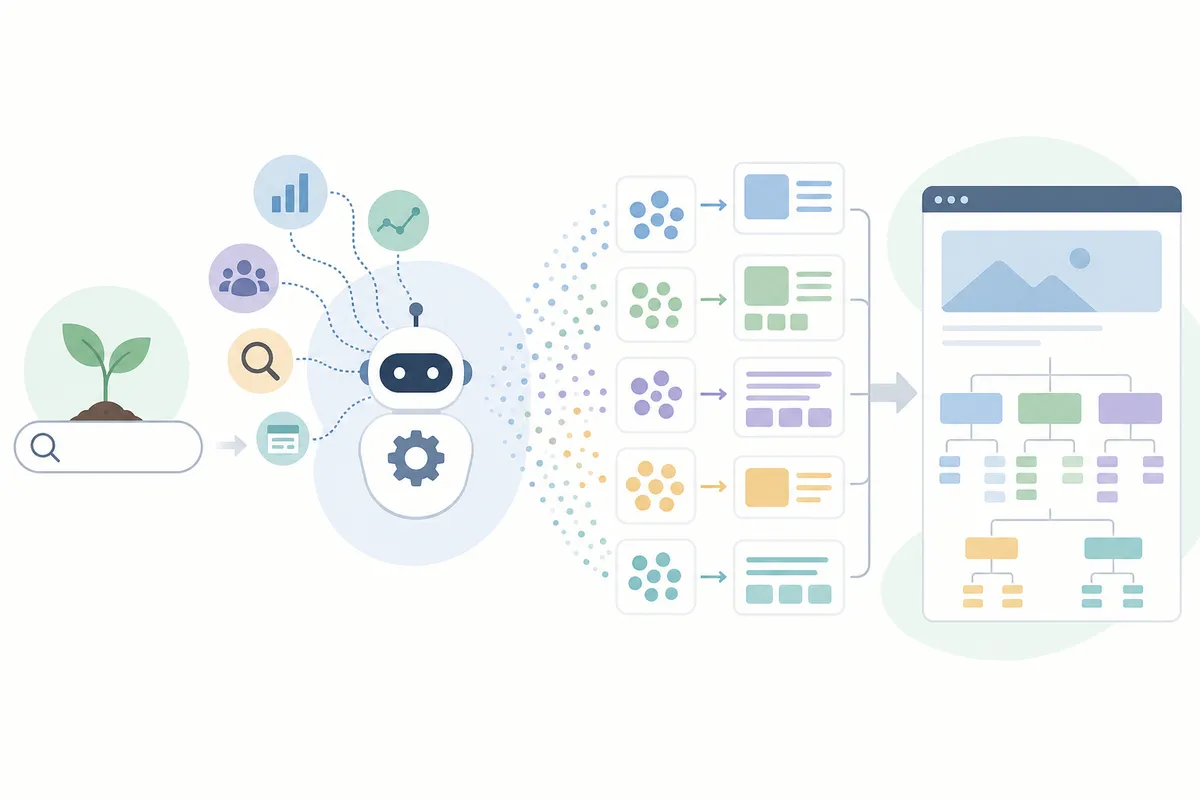
Every automated pipeline performs the same five jobs, whatever the vendor calls them.
- Expansion turns one seed such as "crm software" into a few hundred candidate queries pulled from real search data rather than brainstorming.
- Enrichment attaches monthly volume, competition, and cost-per-click (CPC) figures to every candidate, drawn from a source such as Google Ads data or the DataForSEO API.
- Filtering removes junk through volume floors and blocked terms before you read a single row.
- Intent classification separates queries that signal a purchase from queries that signal reading.
- Clustering groups the keywords that can share one page, and mapping assigns each group a URL.
The tooling ranges from a spreadsheet fed by API calls to platforms that hand back a full site structure. What none of them can do is know your business. Software cannot tell that a keyword names a service you stopped selling, or that a high-volume term belongs to a competitor's brand. Every serious setup keeps a review step for exactly that reason.
Where manual research loses the hours
The manual version of the same work looks like this: export a few hundred rows from a keyword tool, dedupe them, delete the junk queries, guess the intent of each survivor, then group them in a spreadsheet by feel. One automation vendor's mock-up shows the honest starting point most people face: a discovery list of 247 keywords, endless scrolling, no page map. The list is real data, but it decides nothing on its own: someone still has to say which page owns which term, and that is the part deadlines squeeze out first.
The hours go to damage control rather than thinking: duplicates and overlapping phrasings get reconciled by eye, and reruns happen because the first export used the wrong country or missed a seed. The intent column, if anyone fills it in at all, reflects whoever judged 300 rows fastest before lunch.
The worst cost lands later. Grouping by feel produces two pages chasing the same query, and that cannibalization only becomes visible after both pages are published and neither ranks. Fixing it then means merging or redirecting live URLs.
Speed is the pitch every vendor leads with, so treat the numbers as marketing with a real direction. tamer.marketing, one of the newer entrants, advertises a 1,500-keyword job going from roughly 10 hours by hand to 13 minutes, or about 20 minutes with a human review pass. Anyone who has cleaned a 1,500-row export by hand will recognize the order of magnitude.

The pipeline, step by step
Whatever tool you choose, the run itself follows the same sequence.
1. Start from seeds
Five to ten broad terms that describe what you sell, in your customers' words rather than your industry's. The tools handle expansion, so a short seed list beats a long one. A seed that is too generic ("software") expands into noise; a seed that matches a product line ("crm software", "sales pipeline tool") expands into candidates you can use.
2. Expand and enrich
The tool pulls related queries, question phrasings, and long-tail variants, then attaches metrics to each row. Expect hundreds of candidates per seed. At this stage volume is the only number worth glancing at, and only to confirm the seed was sane.
3. Filter before you read anything
Set a volume floor and the low-value rows drop out on their own. In one vendor's walkthrough, a floor of 100 monthly searches keeps "best running shoes" at 2,400 and "marathon training" at 890 while "running tips" at 50 disappears. Block junk terms up front the same way: a store that sells nothing free excludes "free", "cheap", and "diy" before the run instead of deleting those rows afterward.
4. Classify intent before clustering
Modifier words carry most of the signal. "Best", "vs", "pricing", and "cost" mark commercial queries; "how to", "what is", "examples", and "tips" mark informational ones. The order matters: a tool that filters intent before clustering sends buying queries to money pages and questions to articles, so nothing needs re-sorting afterward. "Buy running shoes online" and "how to choose running shoes" should never land on the same page, whatever a similarity score says.
5. Cluster by what Google actually shows
Two keywords belong on one page when the search results for both are largely the same. That test, called SERP overlap, is what separates real clustering from grouping by shared words. Methods differ by tool: tamer.marketing's comparison of the field describes Semrush clustering on top-10 SERP overlap with a 2,000-keyword cap per list, Ahrefs grouping by parent topic with heavy weight on the first result, and Keyword Insights running live SERP checks with an adjustable threshold. Whichever method you use, insist on seeing the evidence. If you cannot check a cluster against a live results page, treat it as a guess.
6. Map every cluster to a URL
This is the step that turns research into a plan. The demo run tamer.marketing shows on its own site takes 11 CRM keywords and returns three pages in 48.5 seconds: a best-CRM page combining "best crm software" (12,100 monthly searches), "crm software for small business" (8,100), and "best crm for startups" (4,400) into one target worth 24,600 combined searches at difficulty 62; a free-tools page worth 12,400; and a pricing comparison page worth 7,200 at difficulty 55. Eleven keywords, three URLs, and no two pages chasing the same query. That mapping is the difference between a CSV and a build plan, and it is the reason keyword research that gives every keyword a page ends in a sitemap rather than an export.
Expect to rerun. Most tools let you change the floor, add a seed, or block a term and go again, and the plan usually settles after two or three passes.
What to feed a run besides seeds
Seeds are the minimum input, and a run gets sharper with three more feeds.
Start with your own Search Console queries: the Performance report lists terms your site already appears for, and rows with many impressions but few clicks mark pages a small update can lift. Feeding those queries into the expansion step anchors the run in demand you have already proven.
Competitor pages are the second input. Zapier's published workflow is built on them: find the top ten ranking pages for your main term, parse each one, and extract the keywords it leans on. A competitor page that appears for many queries is proof of demand someone else is collecting on right now. Skip the giants that rank for everything; the competitor worth parsing is one at roughly your size that keeps showing up for your seed terms.
Location settings are the third. Search demand changes by country and, for local businesses, by city, so tools run research per market on localized data, and Semrush's location selector exists to compare volumes across countries. Someone searching "seo agency in manchester" is a different prospect from someone searching the same service in Singapore, even when the service words match. Set the market before the run, or the volumes describe an audience you do not serve.
Reading the numbers an automated run returns
A run hands back four numbers per keyword, and misreading them wastes the time the automation saved. Semrush's guidance for its own free keyword tool is a usable baseline for what the ranges mean.
| Metric | What it measures | Practical read, per Semrush's guidance | The trap |
|---|---|---|---|
| Monthly search volume | Average searches per month for the term | 100 to 1,000 is a practical starting band for newer or smaller sites | A near-zero-volume keyword rarely earns a dedicated page |
| Keyword difficulty | A 0-100 estimate of how hard page one is to reach | Under 30 is the realistic zone for newer sites | Scores above 80 usually mean major brands with thousands of backlinks hold the page |
| CPC | What advertisers pay per click on the term | Around $3 or more signals the keyword drives revenue | A high CPC with mismatched intent still converts nobody |
| Search intent | What the searcher expects to find | Match the page type to the intent before weighing anything else | A keyword your site cannot satisfy is a skip at any volume |
Those ranges make sample data readable. The dataset tamer.marketing demos with is a CRM keyword set, and five of its rows show how the numbers interact:
| Keyword | Monthly volume | Competition | CPC (listed) |
|---|---|---|---|
| best crm software | 12,100 | High | $12.50 |
| crm software for small business | 8,100 | High | $15.20 |
| free crm software | 6,600 | Medium | $8.40 |
| crm software pricing | 2,400 | High | $14.70 |
| affordable crm solutions | 880 | Low | $5.90 |
"Crm software for small business" pairs 8,100 monthly searches with a listed $15.20 a click. Advertisers pay that per visitor, so an organic ranking on the term replaces real ad spend. "Affordable crm solutions" is the opposite profile: 880 searches, low competition, $5.90. That is the row a newer site wins first. "Crm software pricing" shows why volume alone misleads: 2,400 searches looks minor next to 12,100, but a $14.70 CPC with high competition says the people on that page are buyers, not readers.
Read the four numbers together. A keyword deserves a page when volume, difficulty, and intent all line up with what your site can deliver, which is Semrush's advice as much as anyone's.
Two smaller reads are worth building into the habit. Volume is an average, and demo datasets like the one above carry month-by-month columns beside it for a reason: a term that climbs toward a seasonal peak needs its page published ahead of the rise, because ranking takes longer than writing. And the same enriched output doubles as a paid-search plan. Filter the set for commercial intent and CPCs your budget can carry and you have ad groups built on evidence; Semrush frames this as cutting wasted spend on poor performers, and the logic holds in any tool, since the keywords you bid on decide who sees the ads and what every click costs.
Where long-tail keywords fit in an automated run
Long-tail keywords are the longer, more specific phrasings, "best crm for startups" rather than "crm software". They carry less volume and less competition, and the searcher behind them has usually made half the decision already. In the demo dataset above, "affordable crm solutions" is the shape of the opportunity: 880 monthly searches, low competition, a $5.90 CPC. Nobody brags about a keyword that size, and a newer site can actually win it.
Finding these rows is exactly the work automation is good at. Filter an expansion run for phrases of three or more words, keep the ones under your difficulty ceiling, and pull out the question forms separately, since queries starting "how to", "what is", or "why does" tell you the searcher's exact problem in their own words. Semrush's guidance points these at blog posts, FAQ pages, and niche landing pages, where matching a specific intent beats chasing volume.
The math favors them too. A page that reaches the first page for a small keyword sends more visitors than a page stuck on page five for a big one, and it builds the topical depth that makes the bigger terms reachable later. Long-tail rows are where an automated run pays for itself first.
Three ways to set up automated keyword research
The right setup depends on what you already pay for and who will run it. A separate breakdown of keyword research tools that fit an automated workflow compares specific tools; the three shapes below are what those tools reduce to.
Glue a workflow together yourself
Zapier publishes a recipe that shows the shape: a SERP analysis tool finds the top ten competitors for your main keyword, their addresses go into a Google Sheet, and a Zap chains a web parser with Google Gemini to pull the top keywords from each competitor page back into the sheet. Make publishes a similar scenario built on the DataForSEO API, and the n8n community trades comparable builds. You control every step and pay only for subscriptions you probably hold already. The cost is fragility. When a parser changes its output or an API changes its shape, the chain stops, and usually nothing tells you it stopped.
Use the suite you already pay for
Semrush's Keyword Magic Tool and Ahrefs cover expansion, metrics, and intent labels at scale, and Semrush publishes a free version of its keyword tool that returns volume, difficulty, intent, and CPC per suggestion. Clustering exists in both, and it ends in an export. The gap is the last mile: a spreadsheet of clusters still has to become a page plan by hand, and that is the stage where cannibalization sneaks back in.
Run an end-to-end platform
Platforms in this class take a seed and return a URL map: clusters, intent labels, a primary keyword per page, and a list of unassigned terms with reasons. Three questions sort the good ones from the rest: whether intent is filtered before clustering or bolted on after, whether cannibalization is prevented before writing or repaired after publishing, and whether you can open the SERP evidence behind a cluster you doubt. Skip anything that hides that evidence. The better platforms also export in the shape each audience needs: a tree diagram a client can follow in a meeting, and a keyword-to-URL sheet a developer or writer can build from directly.
| Approach | What you get | Your time | Where it breaks |
|---|---|---|---|
| DIY workflow (Zapier, Make, n8n) | Competitor keywords landing in a spreadsheet on a trigger | Hours to build, minutes per run | One changed API or parser stops the chain, usually silently |
| SEO suite (Semrush, Ahrefs) | Expansion, metrics, intent labels, exportable clusters | Minutes per run, hours turning exports into a plan | The output is a list, so mapping keywords to pages stays manual |
| End-to-end platform | Clusters mapped to URLs with intent filtered up front | Minutes, plus a review pass | Weaker ones hide the SERP evidence behind their clusters |
A keyword list is not a page plan
The rule that keeps a plan honest is one page, one primary keyword. Two pages on your own site chasing the same term compete with each other, and Google tends to rank neither well. Everything a clustering step does exists to enforce that rule before content gets written rather than after.
A good page map also shows what is missing. A keyword that fits no existing URL is a page you have not built yet. Mature tools list unassigned keywords with reasons: an intent mismatch points to a missing service page, a cluster of API and platform queries points to a product page, a recurring segment word points to a tier you do not sell. Read the unassigned list as a backlog.
Structure follows from ownership. A pillar page takes the head term, supporting pages take the specific queries, and every supporting page links back up to the pillar. Local sites multiply this by geography: a city-by-service grid grows to dozens of pages quickly, and without enforced structure those pages start overlapping in exactly the way clustering was meant to prevent.
What still needs a human
Four calls no tool makes reliably.
Relevance is first. Semrush's guidance uses the example of a store that sells new shoes only: "running shoe repair" looks adjacent and is wrong, because the store cannot satisfy that searcher. Software has no way to know what you refuse to sell.
Branded terms are second. A query naming another company, "nike running shoes" being the standard example, sends its clicks to that company's site almost regardless of what you publish. These rows survive every volume filter because the volume is real, so removing them is a person's job.
Third, search the keyword yourself before committing a page to it. If what currently ranks looks nothing like anything you would build, the metrics were describing someone else's opportunity.
Fourth, the plan needs an approval step. Automation proposes; someone who knows the business approves. Every credible tool builds a review stage in, and the ones advertising speed still quote their times with human review included.
One worry to retire before anyone raises it in a meeting: automating research breaks no Google rule. The spam policies in Google Search Essentials police content produced at scale primarily to manipulate rankings, regardless of how it was created, and say nothing about how keywords get analyzed. A machine-built keyword plan executed as genuinely useful pages is ordinary SEO, while the same plan executed as four hundred thin pages is exactly what the policy exists for.
Automated keyword research for AI search
Assistants changed which keywords pay. Definitional head terms increasingly get answered on the results page itself, by an AI Overview or a chat answer, and the click never happens. The queries that still send traffic are specific ones: comparisons, prices, problems, and questions with a real answer behind them.
That shift favors automation, because the winning queries are exactly the ones nobody collects by hand. Question phrasings arrive in the hundreds from a single expansion run, and an intent filter separates the ones worth a page from the ones an assistant will answer inline. Semrush makes the same observation about its own data: long-tail and question-format queries are the types ChatGPT and Perplexity tend to reference in their answers.
The practical move is small. Keep a question-keyword lane in every run, give each question a self-contained answer near the top of its page, and watch which queries get your pages cited by assistants alongside your ordinary rankings.
FAQs
What is automated keyword research?
It is the use of software to expand seed terms into a large keyword set, attach volume, difficulty, and cost data, classify intent, and group the survivors into clusters mapped to pages. It replaces the export-and-cleanup stage of SEO planning and leaves the decisions about relevance and priority to a person.
Can automated keyword research replace manual research completely?
No. Machines are dependable at expansion, filtering, and clustering, and unreliable at relevance. A person still removes branded terms, checks that keywords match what the business sells, and approves the final page map. Vendor workflows keep a review step because the vendors know this too.
Does Google penalize automation in SEO?
Not on the research side. Google's spam policies target scaled content published primarily to manipulate rankings, whatever produced it, and say nothing about how you analyze keywords. Trouble starts when an automated plan is executed as a flood of thin pages rather than a smaller set of useful ones.
How does keyword clustering work?
The reliable method checks SERP overlap: when Google returns largely the same top results for two queries, one page can rank for both, so the two belong in one cluster. Tools vary in strictness; some compare top-ten results, some group by a parent topic, some run live checks per keyword. Grouping by shared words alone is the version that fails.
How often should you rerun automated keyword research?
Rerun it when the business changes: a new service, a new market, a rankings shift you cannot explain. Search demand for most topics moves slowly, so a refresh every few months catches genuine movement without burning budget, while weekly rank tracking handles the short term.
Put one domain through a full run
The quickest way to judge automated keyword research is to watch a run on a domain you already know and argue with its output. If the clusters and the page map hold up against your own knowledge of the business, trust the rest. To see the finished form, talk to the team and walk through a sample SEO report built from exactly this kind of run, then decide what your next ten pages should be.
Resources / References
Sources
About the author
SearchBlueprint researched, wrote and scored this article with the content pipeline our customers run on their own sites. The score in the byline is what our content engine gave this page before it published. Nothing here is reviewed by hand, which is the point: it is the product's output, published where anyone can check it.