How to Optimize Images for SEO Without Slowing Your Site
SearchBlueprint · · 11 min read · scored 92/100

Here is how to optimize images for SEO: compress every file before upload, use descriptive file names and honest alt text, serve modern formats like WebP, lazy-load anything below the fold, and add markup that tells Google which image represents the page. Each step helps search engines find, understand, and rank your images without dragging down page speed.
This guide is written for site owners, marketers, and content teams who publish images on their own websites. It walks through every step in order, from picking the file format to the structured data that gets images cited by AI answer engines.
Key Takeaways
- Images influence far more search results than most site owners realize. On April 29, 2024, the Semrush Sensor showed that 55.62% of standard SERPs in the U.S. included an image pack.
- Size comes first. Common guidance says to keep most web images under 100 KB and no wider than the layout actually needs.
- Alt text and file names do double duty: they make pages accessible to readers and give search engines and AI assistants the context to understand each image.
- Delivery decides indexability. Real
imgtags, responsivesrcsetattributes, lazy loading, and an image sitemap determine whether Google can index your images at all. - Markup such as
og:imageand structured data tells Google which image should represent the page in results, Discover, and rich snippets.
Why image SEO is worth your time
Image results are not a niche corner of search. Research cited in Contentful's image SEO guide suggests Google Images results make up around 22.6% of all internet searches, and that half of online shoppers say product images help them decide to purchase. Semrush adds that Google Lens handles billions of visual searches every month, and its Sensor data showed image packs appearing in more than half of standard U.S. results pages in 2024.
There is a compliance angle too. Contentful notes that the European Accessibility Act now requires certain organizations to provide alt text that accurately reflects each image's purpose. Optimizing images is one of the rare jobs that improves rankings, accessibility, and page speed at the same time.
Image work is one piece of a larger discipline. If you want to see where it fits alongside titles, headings, and content, read this overview of what on-page SEO covers in the AI search era first.

Choose the right image and the right format
Start with an image worth ranking
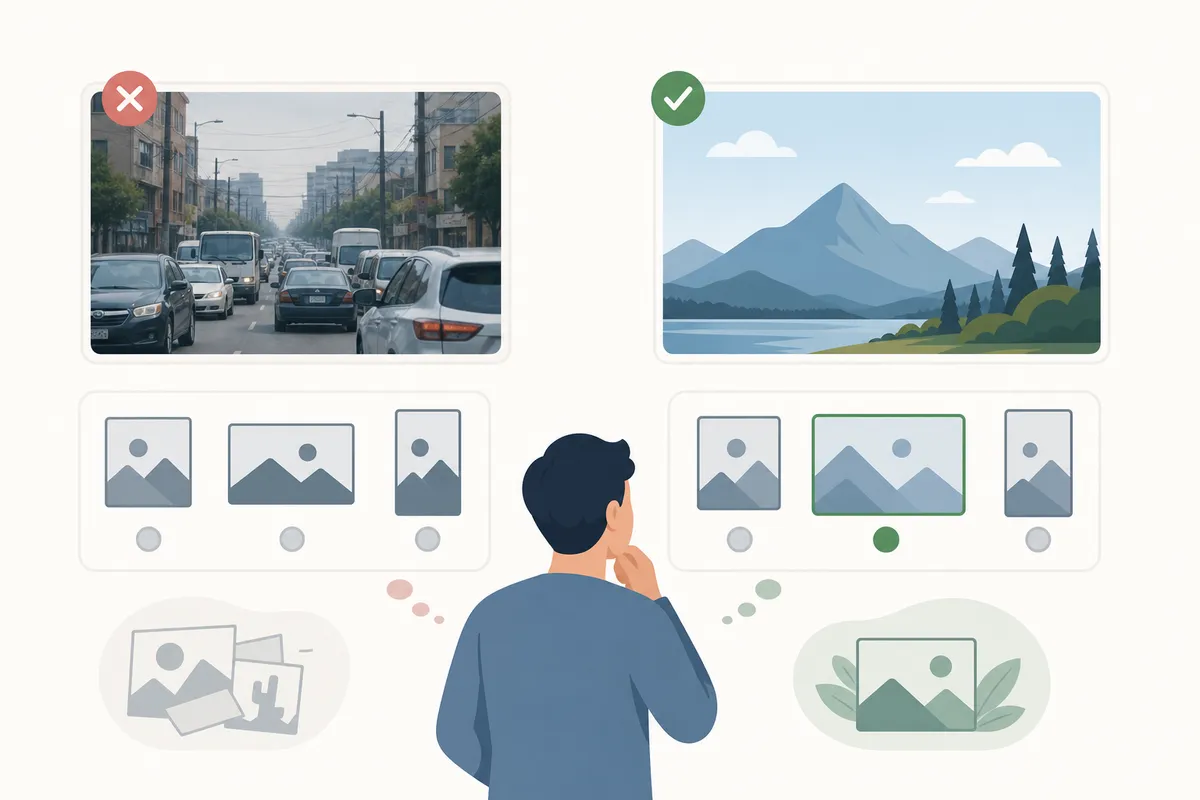
No amount of technical image optimization rescues a generic photo. Original images give Google a reason to rank you, because a stock photo already appears on hundreds of other sites. Match the image type to the job: photos for products, charts for data, screenshots for instructions, icons for navigation. If you use images someone else created, confirm you have permission, since reuse without it can breach copyright.
Match the format to the job
Google Search supports images referenced in the src attribute in BMP, GIF, JPEG, PNG, WebP, SVG, and AVIF formats, and recommends that the file extension match the actual file type. Which one you pick changes both quality and load time.
| Format | Best for | Why it works | Watch out for |
|---|---|---|---|
| WebP | Most photos and general page images | Smaller files than JPEG at similar quality, supports transparency and animation | Not supported by some very old browsers and systems |
| JPEG | Standard photographs when WebP is not an option | Broad compatibility and good lossy compression for photos | No transparency; quality degrades with heavy compression |
| PNG | Images with transparency, text, or fine detail | Lossless quality keeps edges and text crisp | Files run much larger than JPEG or WebP |
| SVG | Logos and icons | Scales to any size with no quality loss and can be styled with CSS | Wrong choice for photographs |
| GIF | Simple animations | Universally supported for short moving images | Large files and limited colors |
| AVIF | Cutting-edge compression | Accepted by Google Search with strong quality-to-size ratios | Tooling and support are still maturing |
Formats are only the start of what images can do for visibility. For the full picture, including how images get pulled into AI answers, see this companion guide to image SEO from alt text to AI citations.
Resize and compress before you upload
Set the pixel dimensions first
A photo straight from a phone or photographer is far larger than any web layout needs. Semrush advises that website images generally do not need to be wider than 2,500 pixels, and one widely shared starter guide for small business sites gets more specific: homepage hero images at 2,500 pixels wide at most, top-of-post blog images around 1,200 pixels, and everything else under 1,000 pixels.
Size to the container, not the screen. An image inside a 700-pixel column gains nothing from being 2,400 pixels wide; the browser downloads the extra pixels and throws them away. Your analytics can also tell you what screen resolutions your visitors actually use, which is a better guide than guessing.
Compress without wrecking quality
Once the dimensions are right, compression shrinks the file further. These are the settings that matter, with the guideline values the ranking guides converge on:
| Setting | What it controls | Common guideline |
|---|---|---|
| Lossy vs. lossless | Whether "non-essential" image data is discarded to save space | Lossy for photos; lossless only when detail is critical |
| Quality factor | The 0-100 quality slider on lossy formats | Semrush suggests 75-85; one starter guide says save at 80% but test the result |
| Resolution | Pixel density, expressed in PPI or DPI | 72 for screens per Semrush's table; some guides allow up to 96 |
| Final file size | The weight the visitor downloads | Ideally under 100 KB per common small-site guidance |
Free tools handle this well: TinyPNG, Squoosh, and GIMP are the popular picks, and Preview on a Mac can resize before you compress. The proof is in measurement, not settings. After compressing a page's images, run the URL through this free website speed test and compare the before and after.

Give every image a descriptive name and honest alt text
File names: short, descriptive, hyphenated
Google's documentation says file names give it signals about the image subject, so chocolate-croissant-cross-section.jpg beats IMG00023.JPG every time. Keep names short but descriptive, separate words with hyphens rather than underscores, and skip generic names like image1.jpg or pic.gif. Two details that are easy to miss: translate file names on localized versions of a page, and consider automating naming if your site holds thousands of images, which is Google's own suggestion at that scale.
Alt text: written for people, read by algorithms
Alt text describes an image for screen reader users and for anyone whose connection fails to load it. Google states that it combines alt text with page content and computer vision to determine what an image shows, and that alt text serves as anchor text when the image is a link. That makes it the single most important piece of image metadata.
The working rules:
- Describe what matters in context, not everything visible. The same chart can carry different alt text on two pages if it proves different points.
- Stay under about 125 characters. Semrush notes some assistive technologies stop reading at that length.
- Skip filler like "image of" or "photo of." The format already announces itself.
- Write alt text for functional images only. Decorative flourishes should carry an empty alt attribute so screen readers pass over them.
- Never stuff keywords. Google Search Central warns that keyword-stuffed alt attributes read as spam and hurt the user experience.
Alt text is one line in a longer pre-publish routine. This 27-point on-page checklist covers the rest of what to verify before a page goes live.
Help search engines find, crawl, and index your images
Use real img elements, not CSS backgrounds
Google's image documentation is blunt on this point: it finds images in the src attribute of img elements, and it does not index CSS background images. If an image matters for search, it belongs in semantic HTML, even when a background style would be easier to write.
Serve responsive images with a fallback
The srcset attribute lets the browser pick the right image size for the screen, so a phone never downloads a desktop-sized file. The picture element goes further, offering modern formats like WebP with an older format as backup. One caveat from Google: not every browser and crawler recognizes these attributes, so always include a plain src fallback on the img element.
Lazy-load below the fold only
Adding loading="lazy" to an image tag delays its download until the visitor scrolls near it, which speeds up the initial page load. Apply it only to images that sit below the fold on every device type. Lazy-loading the hero image delays the most visible element on the page and makes things slower, not faster.
Add an image sitemap
An image sitemap lists the images you want crawled, which catches anything Google's crawler might miss on its own. Unlike standard sitemaps, image sitemaps may include URLs from other domains, which means you can serve images from a CDN and still get them indexed. Google recommends verifying the CDN's domain in Search Console so crawl errors reach you.
Crawlability work like this is also what separates pages that rank from pages that merely exist. These six steps that still get pages onto Google's first page show how image delivery fits into the bigger ranking picture.
Add the markup that earns rich results and AI citations
Declare a preferred image
Google picks a preview image for each page automatically, but you can influence the choice. Its documentation lists two routes: the og:image meta tag, or the primaryImageOfPage property from the Schema.org vocabulary in your structured data. Choose an image that genuinely represents the page, at high resolution, and avoid your logo, text-heavy graphics, or extreme aspect ratios.
Structured data does more than set previews. Google requires the image attribute to be filled in a page's structured data for that content to earn badges and rich results in Google Images, the treatment that puts a recipe photo or product shot directly into image results with extra context attached.
Give AI engines something to quote
AI answer engines assemble responses from what they can read, and they cannot see your photo the way a person does. They read the file name, the alt text, the caption, the surrounding paragraph, and the schema. Google itself says it uses captions, titles, and nearby text to understand images, and Contentful frames the same practice as "multimodal visibility": making one image legible to traditional crawlers and generative engines at once. Place each image next to the text it supports, caption it when a caption adds facts, and keep the page's structured data complete. That combination is what turns an image from decoration into a citable asset.
How to optimize images for SEO: a repeatable workflow
Run this sequence on every new page, and batch it across existing pages one template at a time:
- Pick or create an original image that earns its place on the page.
- Export at the dimensions the layout needs, not the camera's native size.
- Convert to WebP, or SVG for logos and icons, with a JPEG or PNG fallback where needed.
- Compress to the smallest file that still looks sharp, aiming under 100 KB for standard images.
- Rename the file descriptively with hyphens before uploading.
- Write alt text under 125 characters that says what the image shows in context.
- Add
loading="lazy"to below-the-fold images and confirmsrcsetcovers phone screens. - Set the page's
og:image, fill the image field in your structured data, and include the image in your sitemap.
A quick way to find pages that need this treatment: run any URL through this free on-page SEO scorer and check what it flags about images and load performance.
Do it yourself, or bring in help?
For a site with a few hundred images, this is genuinely a do-it-yourself job. The tools are free, and one pass over your highest-traffic pages usually delivers most of the gain. The honest exception is scale: a store with thousands of product photos needs automated naming, bulk compression on upload, and possibly AI-assisted alt text with human review, which is developer territory. Prioritization matters more than perfection either way, and that ordering problem is exactly what a written plan solves. This guide to building an SEO strategy from scratch shows how to slot image work into a broader roadmap instead of treating it as a one-off cleanup.
FAQs
What is the best image format for SEO?
WebP is the strongest default for photos and general page images because it produces smaller files than JPEG at similar quality and supports transparency. Use SVG for logos and icons, JPEG where WebP is not practical, and PNG only when you need lossless detail or transparency that WebP cannot serve.
How big should an image file be for good SEO?
As small as it can be while still looking sharp. Common guidance from small-site SEO guides puts the target under 100 KB for standard images, with dimensions no wider than the layout requires, which usually means 2,500 pixels at the absolute maximum for full-width heroes.
Does alt text actually affect rankings?
Yes, though indirectly and modestly. Google says it uses alt text together with page content and computer vision to understand what an image shows, and alt text acts as anchor text when an image links somewhere. Its first job is accessibility for screen reader users, and text written for that purpose is exactly what search engines reward.
Should every image on a page have alt text?
No. Functional images that carry meaning need descriptive alt text. Decorative images should carry an empty alt attribute so screen readers skip them, which keeps the listening experience clean without hiding anything that matters.
Do optimized images help with AI search engines like ChatGPT and Perplexity?
Yes. AI engines interpret images through their text signals: file names, alt text, captions, surrounding copy, and structured data. An image with a descriptive name, honest alt text, and complete schema is far more likely to be understood and cited than the same image uploaded as IMG_4021.jpg with an empty alt attribute.
Talk to the team
Pick your highest-traffic page today, compress its images, fix the file names, rewrite the alt text, and re-test its speed, because one page done properly teaches you more than any checklist. If you would rather see how to optimize images for SEO across an entire site at once, look through a sample SEO report to see every image, speed, and markup issue surfaced in one document, then talk to the team about running the same audit on your domain.
Resources / References
- European Accessibility Act
- Google Search supports images
- empty alt attribute
- Google Search Central
loading="lazy"- image sitemaps may include URLs from other domains
- schema.org
Sources
About the author
SearchBlueprint researched, wrote and scored this article with the content pipeline our customers run on their own sites. The score in the byline is what our content engine gave this page before it published. Nothing here is reviewed by hand, which is the point: it is the product's output, published where anyone can check it.