The Workflow for Automated Backlink Tracking (And What It Costs)
SearchBlueprint · · 9 min read · scored 95/100
A workflow for automated backlink tracking pairs a monitoring tool that flags new and lost links with a manual qualification step, a CRM for outreach, and a weekly reporting cadence. That way, you catch link changes within days instead of finding out by accident months later.
What "Automated Backlink Tracking" Actually Means
Automated backlink tracking isn't one tool doing one job. It's monitoring (a system that notices a link appeared or disappeared). It's also qualification (deciding whether that link is worth keeping, pursuing, or disavowing). And it's reporting (turning both into something you can act on weekly). Most teams that say their backlink tracking is "automated" have only automated the first piece.
That gap matters. A monitoring alert tells you a new link exists. It doesn't tell you whether the referring domain is relevant to your niche. It doesn't tell you whether the anchor text looks natural, or whether the site is the kind Google would flag under its link scheme guidance. Automating that judgment call fully is still risky. That's why the workflow below keeps a person at the qualification step even as everything else runs on a schedule.

Why Manual Tracking Falls Apart First

Before automating anything, it helps to know exactly where manual backlink work breaks. Ahrefs' 2023 State of Link Building report found that 65% of SEO professionals rank link building as their single most time-intensive activity. Fewer than 20% said they run it with any systematic process at all. Most are working from a spreadsheet, checking it when they remember to.
That shows up in results. Cold outreach run off ad hoc spreadsheets commonly converts around 2%. That means a hundred emails sent to unqualified prospects nets roughly two replies worth following up on. The fix usually isn't sending more emails, it's automating the discovery and monitoring steps. That way, the time you do spend goes into qualifying prospects and writing better outreach, not hunting for who to contact. See this breakdown of how to automate SEO tasks without losing quality control for the broader case. It covers which SEO tasks are worth automating in the first place.
The Tools and Components a Tracking Workflow Needs
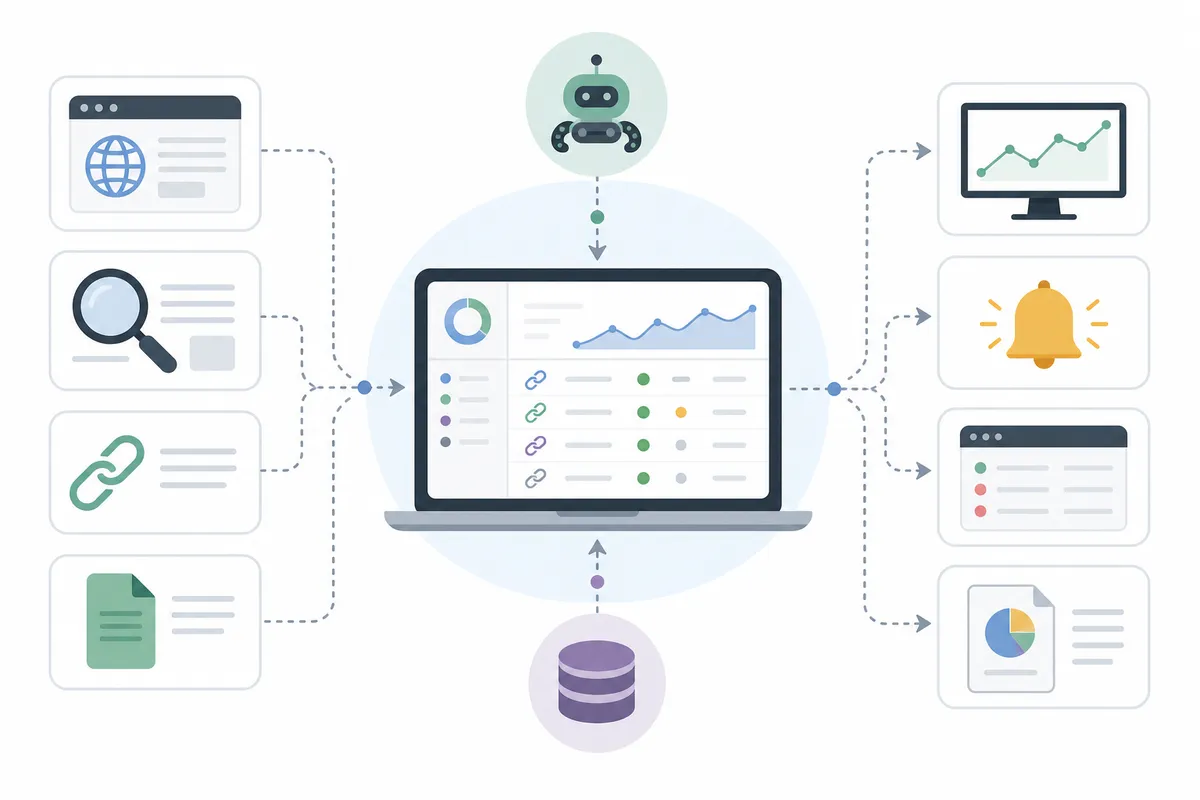
A working backlink tracking workflow has four functional pieces, and they rarely live in one product. Here's what each one does and what it typically costs.
Discovery and Monitoring
This layer scans for backlink opportunities and watches your existing profile for new and lost links. It's the part most "backlink tools" actually sell, a table of monitored URLs with new-link and lost-link timelines.
Qualification and Scoring
This is the step automation handles worst on its own. A link needs a human (or a very well-tuned rule set) to check relevance, referring-domain authority, and anchor-text pattern. That happens before it's added to an outreach list or trusted in your profile.
Outreach and CRM
Once a prospect qualifies, this layer sends the first email, schedules follow-ups, and tracks replies. That's the same job a sales CRM does, just pointed at link prospects instead of leads.
Verification and Reporting
The last layer confirms a promised link actually went live. Then it rolls new links, lost links, and outreach conversion into a report on a fixed cadence. Weekly is the common default. See this guide to tracking SEO performance and proving it's working for more on building that reporting habit. It helps make results provable rather than assumed.
| Tool Tier | Typical Cost | What It Automates | Best Fit |
|---|---|---|---|
| Free or low-cost monitoring | $0-$100 a month | New and lost link alerts only | A single small site testing the process |
| Mid-tier SaaS stack | $100-$500 a month | Discovery, monitoring, CRM handoff, basic reporting | One marketer running outreach for one or two sites |
| Business-tier automation suite | Around $6,000 a year for the license alone | Prospecting, outreach sequencing, qualification scoring, monitoring | Teams sending outreach at volume |
| Agency-managed program | Entry packages under $1,000, scaling with budget | The whole workflow run for you, vetted links delivered | Businesses that want results without building the workflow themselves |
Cost alone isn't the deciding factor. Some platforms lean on scale for credibility. One major SEO suite's own marketing cites use by more than 30% of Fortune 500 companies. But scale doesn't tell you whether a tool flags a low-quality link before it drags your domain down. For a closer look at what AI-driven tools genuinely save versus what they cost, see what AI-driven SEO tools cost and where they fall short.
Building the Backlink Tracking Workflow Step by Step
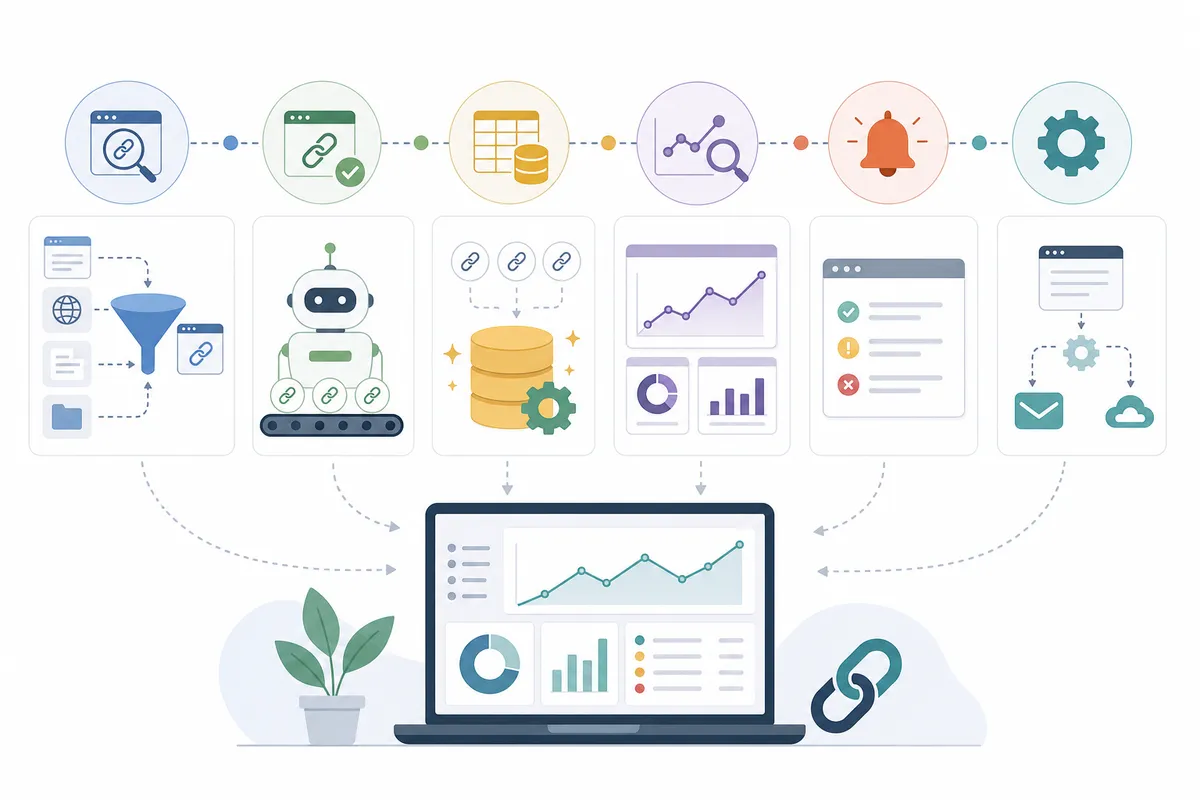
Step 1: Set Up Discovery
Connect a monitoring tool to your domain and your top competitors' domains. Competitor monitoring matters as much as your own. A link that worked for a competitor often works for you. You'll see it the week it happens instead of months later in a manual audit.
Step 2: Qualify Every New Prospect
Before any link or prospect enters your outreach list, check three things. Topical relevance to your site, the referring domain's general authority, and whether the placement looks editorial rather than paid or manipulative all matter. This step stays manual or semi-manual by design, it's where automated workflows most often go wrong when nobody reviews the output.
Step 3: Run Outreach and Follow-Up
Once a prospect clears qualification, automated sequencing handles the first email and one or two follow-ups on a schedule. Personalize the opening line by hand; templated bulk email is exactly what drags conversion down toward that 2% floor.
Step 4: Monitor and Verify
After a link is promised, verify it actually published and that it's live (not a 404 or a redirect chain). Also check that the anchor text matches what was agreed. Ongoing monitoring then watches for the link disappearing later, links get quietly removed during site redesigns more often than most teams expect.
Step 5: Report on a Fixed Cadence
Weekly is the standard interval for a backlink tracking report: new links, lost links, prospects in each outreach stage, and conversion rate. A fixed cadence is what turns tracking from a one-off audit into an actual workflow.
In-House Team vs an Automated Workflow: the Real Cost
Building this in-house means hiring for it. Industry pay data puts a dedicated link-building specialist at an average salary above $40,000 a year. It also estimates roughly $53,000 for a guest-post writer, plus around $6,000 a year for a business-tier automation license. Add those together and a fully staffed in-house program runs close to $100,000 a year, before you've acquired a single backlink.
| Cost Line | In-House Program | Outsourced / Agency Route |
|---|---|---|
| Link-building specialist | Average salary above $40,000 a year | Included in the package price |
| Guest-post writer | Average salary around $53,000 a year | Included in the package price |
| Automation tooling license | Around $6,000 a year for a business-tier plan | Included in the package price |
| Approximate first-year total | Just under $100,000, before acquiring a single link | Entry-level packages start under $1,000 a month |
That gap is why most small and mid-size teams run a lighter version of this workflow themselves with mid-tier tools. Or they hand the whole thing to an agency and keep the qualification review in-house as an oversight step.
Common Mistakes That Break an Automated Backlink Tracking Workflow
- Automating outreach before qualification. Sending personalized-looking emails to every domain a discovery tool surfaces, with no relevance check, is the spammy-outreach pattern. Google's own Search Essentials guidance specifically calls this out as a risk. It pulls conversion rates down well below that 2% baseline.
- Treating monitoring as the whole workflow. A tool that only alerts you to new and lost links isn't tracking backlinks; it's watching them. Without qualification and reporting attached, the alerts pile up unread.
- No fixed reporting cadence. Teams that check backlinks "whenever" lose the ability to spot a sudden drop early, which is usually when it's cheapest to fix.
- Ignoring lost links. A link disappearing during a client's site migration is common and fixable if caught within weeks, much harder to chase down months later.
- Chasing volume over relevance. More monitored domains isn't the goal. A smaller list of genuinely relevant, qualified prospects converts better than a large unfiltered one. This guide to what's safe to automate and what still needs a human covers where that line sits across SEO work generally, not just backlinks.
When to Keep a Human in the Loop
Discovery, monitoring, verification, and reporting can run almost entirely on a schedule once they're set up. Qualification and the first outreach message are the two places a person should stay involved. They're also the two places that determine whether the rest of the automated backlink tracking workflow produces useful links or just a longer spreadsheet.
FAQs
How often should backlinks be checked in an automated workflow?
Weekly is the common cadence for monitoring new and lost links. If you're running active outreach, daily alerts on new links help you catch problems, like a referring domain that's suddenly become spammy, before they compound.
What's the difference between backlink monitoring and backlink tracking?
Monitoring is the alert layer: a tool flags that a link appeared or disappeared. Tracking is the fuller workflow, monitoring plus qualification, categorization, and reporting. That way you know not just that a link showed up, but whether it's worth keeping or pursuing more of.
Can free tools handle automated backlink tracking?
Free and low-cost tiers handle basic new and lost link alerts for a small site. But they typically cap how many links you can monitor and skip qualification scoring. Once your backlink profile passes a few hundred links, you'll usually need a paid upgrade or a manual review step alongside it.
Do I need a specialist to run this workflow, or can one marketer handle it?
One marketer can run this workflow for a single site with a mid-tier SaaS stack. The in-house cost only climbs toward the near-$100,000 range once you add a dedicated link builder, a writer, and a business-tier automation license for higher outreach volume.
What's the biggest reason these workflows fail?
Skipping qualification. Automation is good at flagging links and sending emails at scale. But a workflow that emails every domain a tool surfaces, without checking relevance and authority first, is the exact pattern that drags outreach conversion down. It also invites the kind of link-scheme scrutiny Google's guidelines warn against.
Set Up Discovery and Monitoring First
Don't try to build all five steps at once. Turn on discovery and monitoring this week, then run qualification manually for the first month so you know what "good" looks like. Layer in automated outreach sequencing once that judgment is second nature. You might want a second opinion on how your current backlink profile sits alongside the rest of your site's technical and content health. If so, talk to the team. Start with a sample SEO report to see exactly what a fully tracked workflow for automated backlink tracking looks like in practice.
Resources / References
Sources
About the author
SearchBlueprint researched, wrote and scored this article with the content pipeline our customers run on their own sites. The score in the byline is what our content engine gave this page before it published. Nothing here is reviewed by hand, which is the point: it is the product's output, published where anyone can check it.